
Your account
Another platform administrator creates your account under User Management, on the SSA tab (see User accounts). You receive an email titled Your EOSB account has been created with your username and a link to set your password. Setting the password and signing in work the same way for every user; see Set your password and Sign in.A new environment starts with no users at all. The first platform administrator is created by the technical team that installs the platform; every other account is created from the screens.
Your workspace
After signing in you arrive on Employment.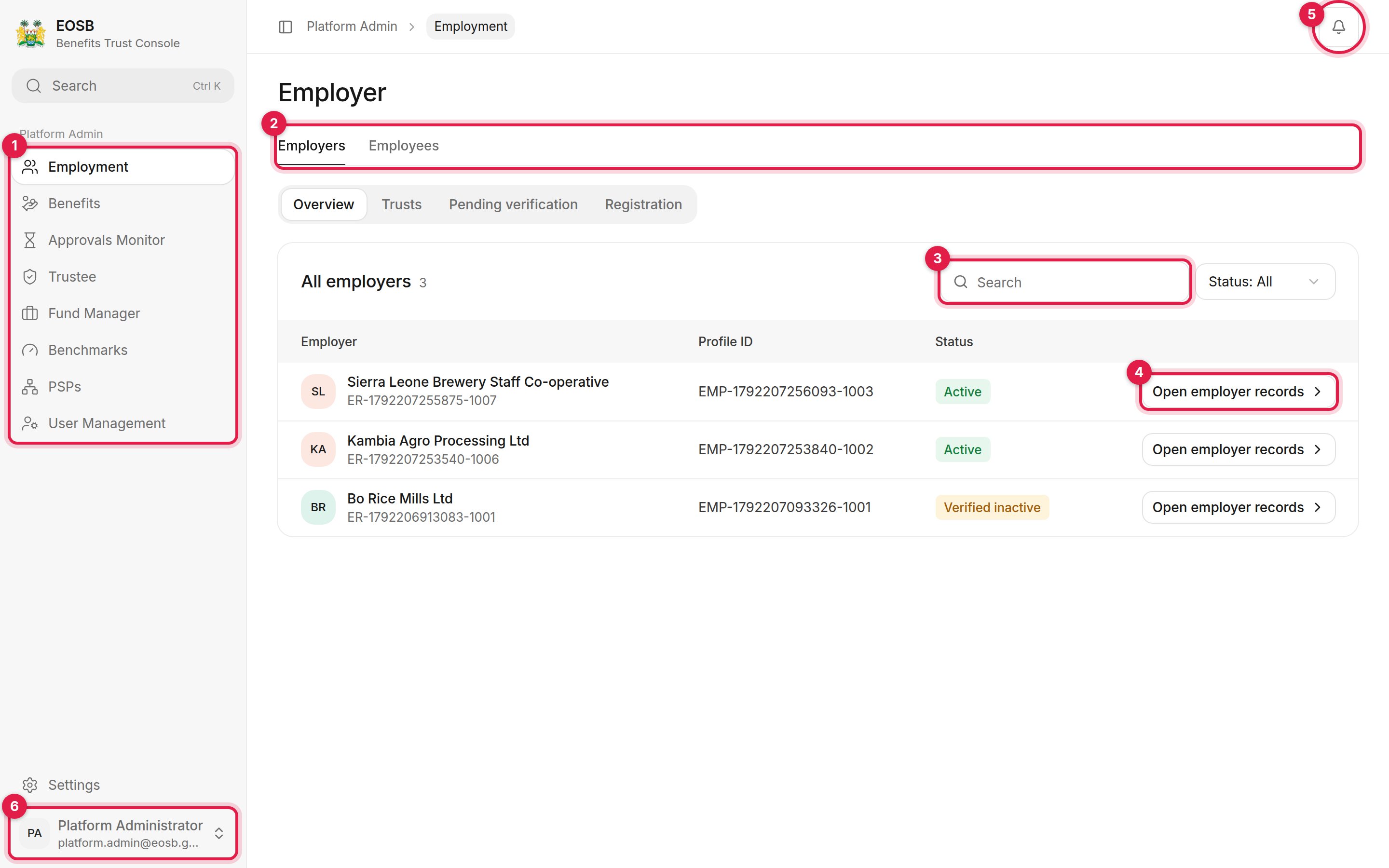
The platform admin workspace
- Navigation:
- Employment — employers, their trusts, registrations and employees
- Benefits — approved benefit payments waiting to be paid out
- Approvals Monitor — every decision the platform is waiting on
- Trustee and Fund Manager — register providers and see who is registered
- Benchmarks — the investment benchmarks portfolios are measured against
- PSPs — payment service providers connected to the platform
- User Management — user accounts for every organisation
- Tabs switch between areas of a page. Many pages have a second row of tabs underneath, like Overview, Trusts, Pending verification and Registration here.
- Search narrows a list. Use Status next to it to filter.
- Open employer records (or Review, View, Manage on other pages) opens one record.
- Notifications.
- User menu, with Settings and Sign out. Settings work the same for every user; see Your account.