> ## Documentation Index
> Fetch the complete documentation index at: https://docs.eosb.org/llms.txt
> Use this file to discover all available pages before exploring further.
# Start here
> What a trustee does on the EOSB platform, how money moves through the trusts you hold, and how to use this guide.
New to the platform? Start with [How the platform works](/concepts/how-it-works) and [Roles and responsibilities](/concepts/roles). Every workflow is drawn out under **How EOSB works**.
As a trustee you hold the EOSB trusts that employers fund, and you are the control on every movement of money in and out of them. Nothing counts as funded, is invested, is spent above the limit or is paid out without your confirmation.
## How money moves
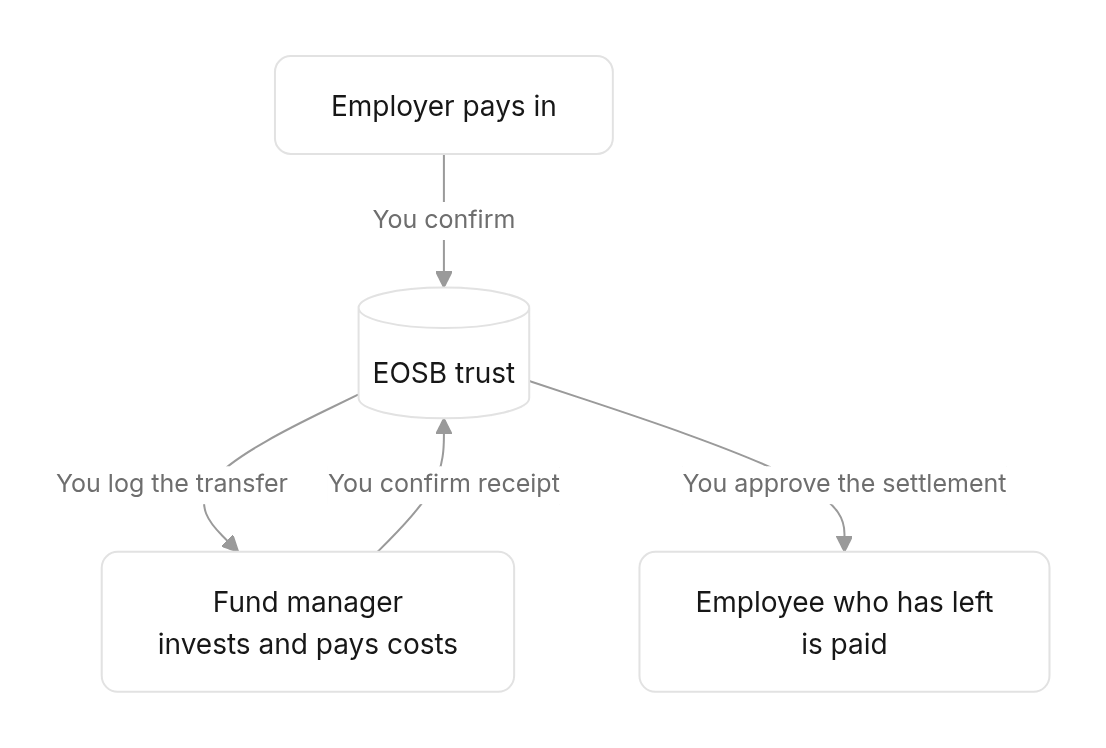
 | Your decision | What it protects |
| - | - |
| [Confirm employer funding](/trustee/funding-approvals) | Only money that really arrived counts towards the employer's funded amount. |
| [Log transfers to the fund manager](/trustee/fund-management) | Every amount sent out of the trust has an audit record and evidence. |
| [Approve differences in recognised cash](/trustee/cash-recognition) | The fund manager cannot quietly book more or less than you sent. |
| [Decide large expenses and budgets](/trustee/expenses) | Costs are paid from the trust only within an agreed plan. |
| [Approve benefit payments](/trustee/benefit-payments) | Leavers are paid the right amount, and only once. |
| [Portfolio oversight](/trustee/portfolio-oversight) | You can see the money is invested as agreed. |
## Find what you need
1. [Set your password and sign in](/trustee/getting-started) — the link arrives when the regulator verifies your organisation.
2. Check your phone and email are right in **Settings**: one-time codes are sent there.
Start on the [dashboard](/trustee/getting-started#the-dashboard). **Pending approvals** shows everything waiting for you.
1. [Confirm funding proofs](/trustee/funding-approvals) against the trust bank statement.
2. [Approve benefit payments](/trustee/benefit-payments) for employees who have left.
3. Clear [cash recognition](/trustee/cash-recognition) and [expenses](/trustee/expenses) waiting for you.
1. Send the fund manager what the trusts do not need to hold as cash, and [log each transfer](/trustee/fund-management).
2. Check the [transfer register](/trustee/fund-management#drafts-and-the-register) — every transfer should be **Recognised**.
3. After month-end, review the [asset register, allocation variance and ROI](/trustee/portfolio-oversight).
| Situation | Go to |
| - | - |
| A proof does not match the bank statement | [Reject the proof](/trustee/funding-approvals#review-one-proof) with the reason |
| The fund manager booked a different amount than you sent | [Cash recognition](/trustee/cash-recognition) |
| You cannot log a transfer: "Insufficient employer-funded trust cash" | [If logging is refused](/trustee/fund-management#if-logging-is-refused) |
| A leaver's payment has no payout account | [Check the details](/trustee/benefit-payments#check-the-details) |
| An asset type is outside tolerance | [Allocation variance](/trustee/portfolio-oversight#allocation-variance) |
Approving a benefit payment and logging a transfer ask for a **one-time code**, sent by SMS, email and WhatsApp to the contact details on your account.
| Term | Meaning |
| - | - |
| Funding proof | The employer's evidence of a payment into the trust. |
| Employer-funded trust cash | Money you have confirmed into the trust and not yet sent on. You cannot send the fund manager more than this. |
| Recognition | The fund manager's confirmation of how much of a transfer arrived. |
| Variance | Recognised minus logged: positive if more arrived, negative if less. |
| Expense budget | The fund manager's plan for a trust's running costs. It must be approved before they can spend. |
| Final settlement | The benefit owed to an employee who has left: everything they had accrued. |
| Allocation variance | How far the portfolio's actual mix is from its agreed policy mix. |
This documentation is built and hosted on [Mintlify](https://mintlify.com), a developer documentation platform.
| Your decision | What it protects |
| - | - |
| [Confirm employer funding](/trustee/funding-approvals) | Only money that really arrived counts towards the employer's funded amount. |
| [Log transfers to the fund manager](/trustee/fund-management) | Every amount sent out of the trust has an audit record and evidence. |
| [Approve differences in recognised cash](/trustee/cash-recognition) | The fund manager cannot quietly book more or less than you sent. |
| [Decide large expenses and budgets](/trustee/expenses) | Costs are paid from the trust only within an agreed plan. |
| [Approve benefit payments](/trustee/benefit-payments) | Leavers are paid the right amount, and only once. |
| [Portfolio oversight](/trustee/portfolio-oversight) | You can see the money is invested as agreed. |
## Find what you need
1. [Set your password and sign in](/trustee/getting-started) — the link arrives when the regulator verifies your organisation.
2. Check your phone and email are right in **Settings**: one-time codes are sent there.
Start on the [dashboard](/trustee/getting-started#the-dashboard). **Pending approvals** shows everything waiting for you.
1. [Confirm funding proofs](/trustee/funding-approvals) against the trust bank statement.
2. [Approve benefit payments](/trustee/benefit-payments) for employees who have left.
3. Clear [cash recognition](/trustee/cash-recognition) and [expenses](/trustee/expenses) waiting for you.
1. Send the fund manager what the trusts do not need to hold as cash, and [log each transfer](/trustee/fund-management).
2. Check the [transfer register](/trustee/fund-management#drafts-and-the-register) — every transfer should be **Recognised**.
3. After month-end, review the [asset register, allocation variance and ROI](/trustee/portfolio-oversight).
| Situation | Go to |
| - | - |
| A proof does not match the bank statement | [Reject the proof](/trustee/funding-approvals#review-one-proof) with the reason |
| The fund manager booked a different amount than you sent | [Cash recognition](/trustee/cash-recognition) |
| You cannot log a transfer: "Insufficient employer-funded trust cash" | [If logging is refused](/trustee/fund-management#if-logging-is-refused) |
| A leaver's payment has no payout account | [Check the details](/trustee/benefit-payments#check-the-details) |
| An asset type is outside tolerance | [Allocation variance](/trustee/portfolio-oversight#allocation-variance) |
Approving a benefit payment and logging a transfer ask for a **one-time code**, sent by SMS, email and WhatsApp to the contact details on your account.
| Term | Meaning |
| - | - |
| Funding proof | The employer's evidence of a payment into the trust. |
| Employer-funded trust cash | Money you have confirmed into the trust and not yet sent on. You cannot send the fund manager more than this. |
| Recognition | The fund manager's confirmation of how much of a transfer arrived. |
| Variance | Recognised minus logged: positive if more arrived, negative if less. |
| Expense budget | The fund manager's plan for a trust's running costs. It must be approved before they can spend. |
| Final settlement | The benefit owed to an employee who has left: everything they had accrued. |
| Allocation variance | How far the portfolio's actual mix is from its agreed policy mix. |
This documentation is built and hosted on [Mintlify](https://mintlify.com), a developer documentation platform.