> ## Documentation Index
> Fetch the complete documentation index at: https://docs.eosb.org/llms.txt
> Use this file to discover all available pages before exploring further.
# Send money to the fund manager
> Log the bank transfers you make from a trust to its fund manager.
Money the trusts do not need to keep as cash goes to the fund manager to invest. When you move it, you record it here.
**Where:** **Fund Management** in the menu. **Before you start:** the employer's payments must be [confirmed](/trustee/funding-approvals) — you can only send what has been confirmed into the trust. For a bank transfer, make the transfer first and have the bank's reference and instruction to hand.
When you move money from a trust's bank account to the fund manager, record it under **Fund Management**. The platform keeps the audit record — it does not move the money for a bank transfer. The fund manager then confirms what arrived.
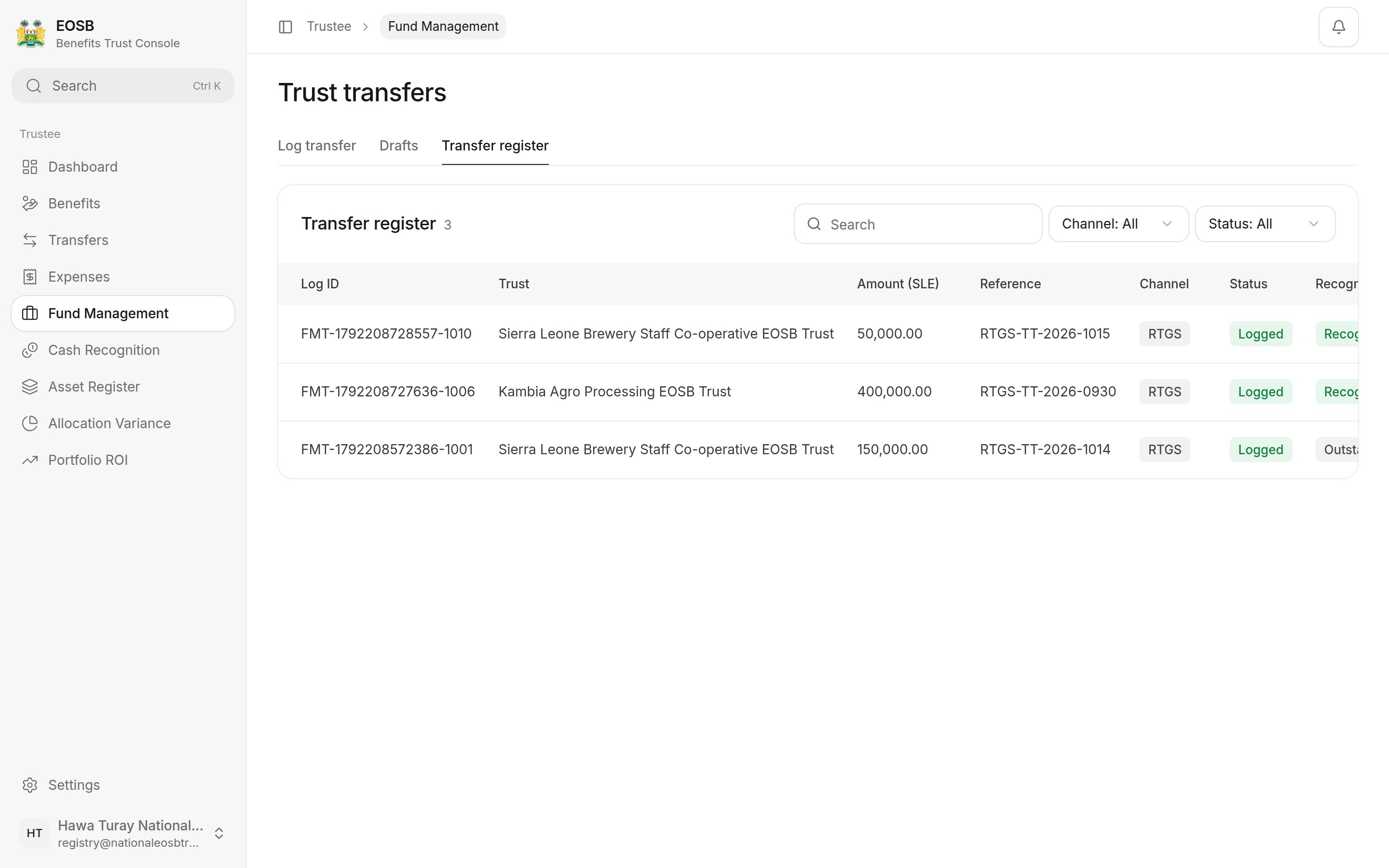
The page has three tabs: **Log transfer**, **Drafts** and **Transfer register**.
## Log a bank transfer
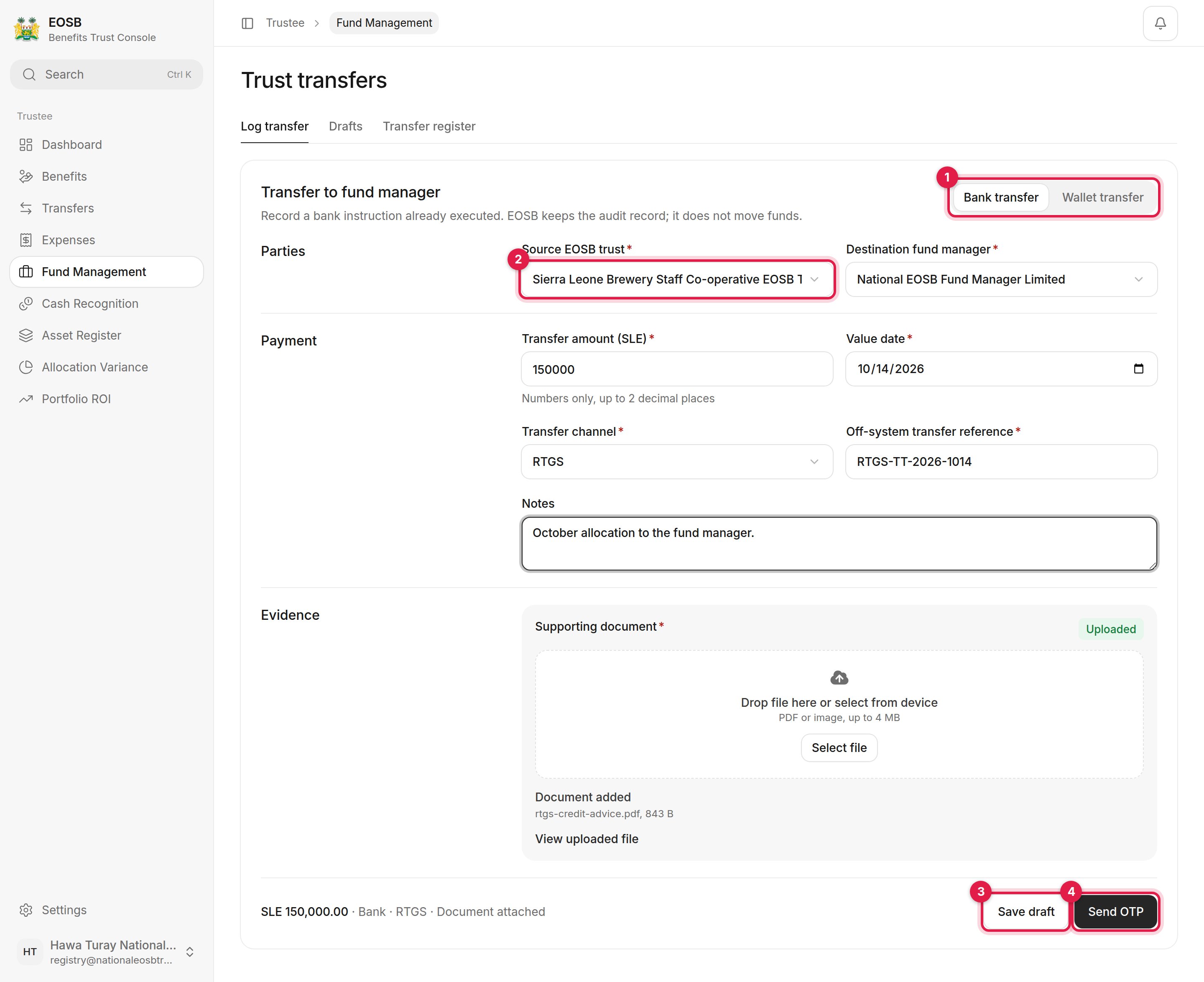 **Destination fund manager** fills in with the trust's linked fund manager.
| Field | What to enter |
| - | - |
| Transfer amount (SLE) \* | No more than the employer-funded cash in the trust |
| Value date \* | The date the bank moved the money |
| Transfer channel \* | RTGS, wire, cheque and so on |
| Off-system transfer reference \* | The bank's reference. It must not repeat a recent one. |
| Notes | Optional context for the fund manager and auditors |
The bank instruction or credit advice; a PDF or image of up to 4 MB. Wait until it says **Uploaded**.
Enter the code you receive and select **Log Transfer**. Select **Save draft (3)** instead to finish later.
**Destination fund manager** fills in with the trust's linked fund manager.
| Field | What to enter |
| - | - |
| Transfer amount (SLE) \* | No more than the employer-funded cash in the trust |
| Value date \* | The date the bank moved the money |
| Transfer channel \* | RTGS, wire, cheque and so on |
| Off-system transfer reference \* | The bank's reference. It must not repeat a recent one. |
| Notes | Optional context for the fund manager and auditors |
The bank instruction or credit advice; a PDF or image of up to 4 MB. Wait until it says **Uploaded**.
Enter the code you receive and select **Log Transfer**. Select **Save draft (3)** instead to finish later.
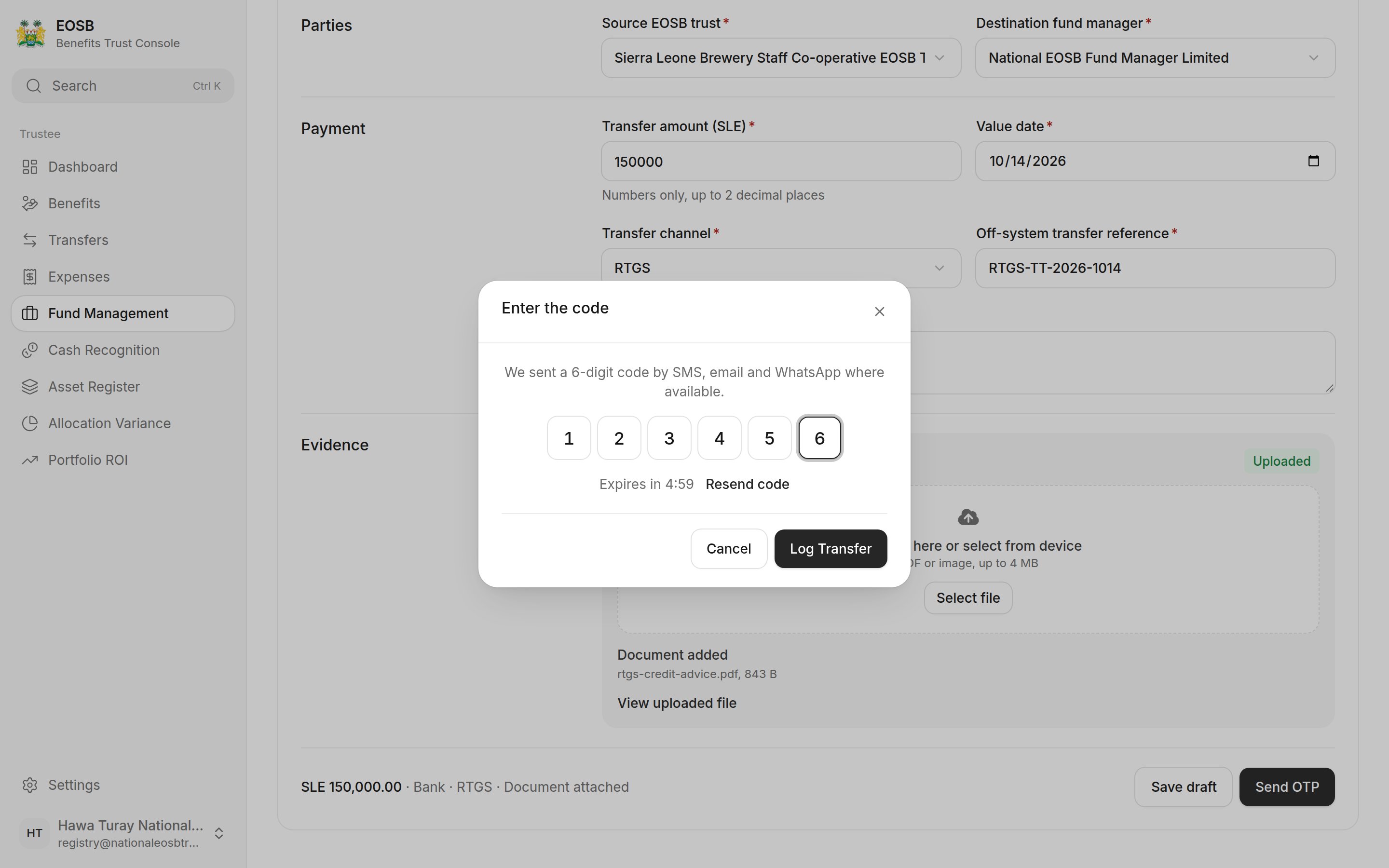 The transfer appears in the **Transfer register** as **Logged**.
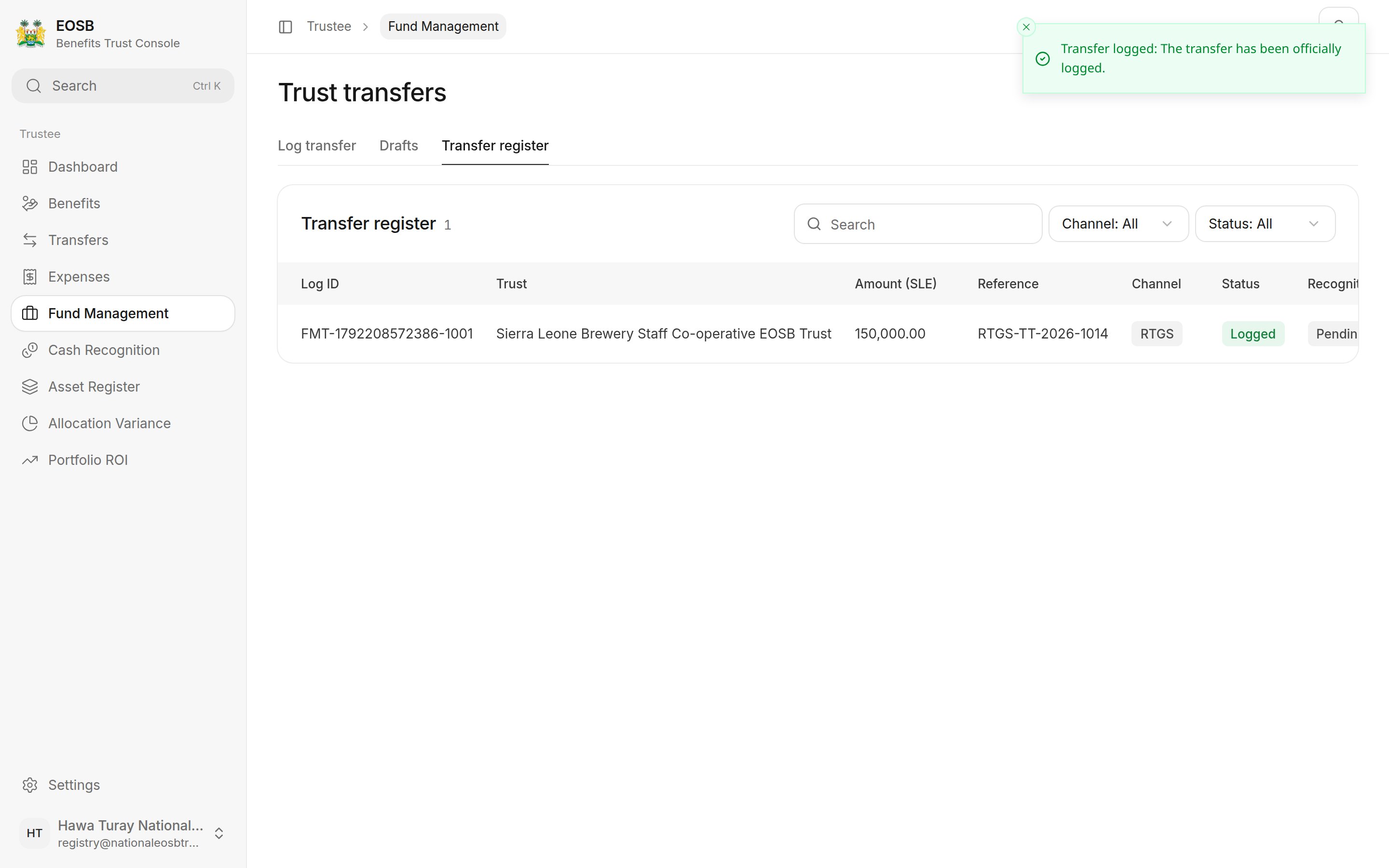 ## Wallet transfer
**Wallet transfer** moves the money for you, from the trust wallet to the fund manager's wallet, once you confirm with the code. There is no bank reference or document to add.
## Wallet transfer
**Wallet transfer** moves the money for you, from the trust wallet to the fund manager's wallet, once you confirm with the code. There is no bank reference or document to add.
 ## Drafts and the register
**Drafts** lists transfers you saved; select **Resume** to finish one. The **Transfer register** lists every logged transfer and the fund manager's recognition of it.
## Drafts and the register
**Drafts** lists transfers you saved; select **Resume** to finish one. The **Transfer register** lists every logged transfer and the fund manager's recognition of it.
 | Recognition | Meaning |
| - | - |
| Pending | The fund manager has not confirmed it yet. |
| Recognised | The fund manager confirmed the full amount. |
| Outstanding receipt | The fund manager confirmed less than you sent; the rest is still expected. |
| Pending trustee approval | The fund manager confirmed more than you sent. See [Cash recognition](/trustee/cash-recognition). |
## What happens next
The fund manager checks their bank account and [recognises](/fund-manager/cash-recognition) what arrived. If it is the amount you logged, the transfer becomes **Recognised** and nothing more is needed from you. If they recognise a different amount and do not expect the rest, it comes back to you under [Cash recognition](/trustee/cash-recognition).
## If logging is refused
| Message | What to do |
| - | - |
| Insufficient employer-funded trust cash | The amount is more than the employer has paid in. Confirm pending [funding proofs](/trustee/funding-approvals) first, or send less. |
| Duplicate off-system transfer reference | That reference was used recently. Check you are not logging the same transfer twice. |
**Next:** [cash recognition](/trustee/cash-recognition).
This documentation is built and hosted on [Mintlify](https://mintlify.com), a developer documentation platform.
| Recognition | Meaning |
| - | - |
| Pending | The fund manager has not confirmed it yet. |
| Recognised | The fund manager confirmed the full amount. |
| Outstanding receipt | The fund manager confirmed less than you sent; the rest is still expected. |
| Pending trustee approval | The fund manager confirmed more than you sent. See [Cash recognition](/trustee/cash-recognition). |
## What happens next
The fund manager checks their bank account and [recognises](/fund-manager/cash-recognition) what arrived. If it is the amount you logged, the transfer becomes **Recognised** and nothing more is needed from you. If they recognise a different amount and do not expect the rest, it comes back to you under [Cash recognition](/trustee/cash-recognition).
## If logging is refused
| Message | What to do |
| - | - |
| Insufficient employer-funded trust cash | The amount is more than the employer has paid in. Confirm pending [funding proofs](/trustee/funding-approvals) first, or send less. |
| Duplicate off-system transfer reference | That reference was used recently. Check you are not logging the same transfer twice. |
**Next:** [cash recognition](/trustee/cash-recognition).
This documentation is built and hosted on [Mintlify](https://mintlify.com), a developer documentation platform.