> ## Documentation Index
> Fetch the complete documentation index at: https://docs.eosb.org/llms.txt
> Use this file to discover all available pages before exploring further.
# Start here
> What a regulator officer at MELSS does on the EOSB platform, how it fits with everyone else, and how to use this guide.
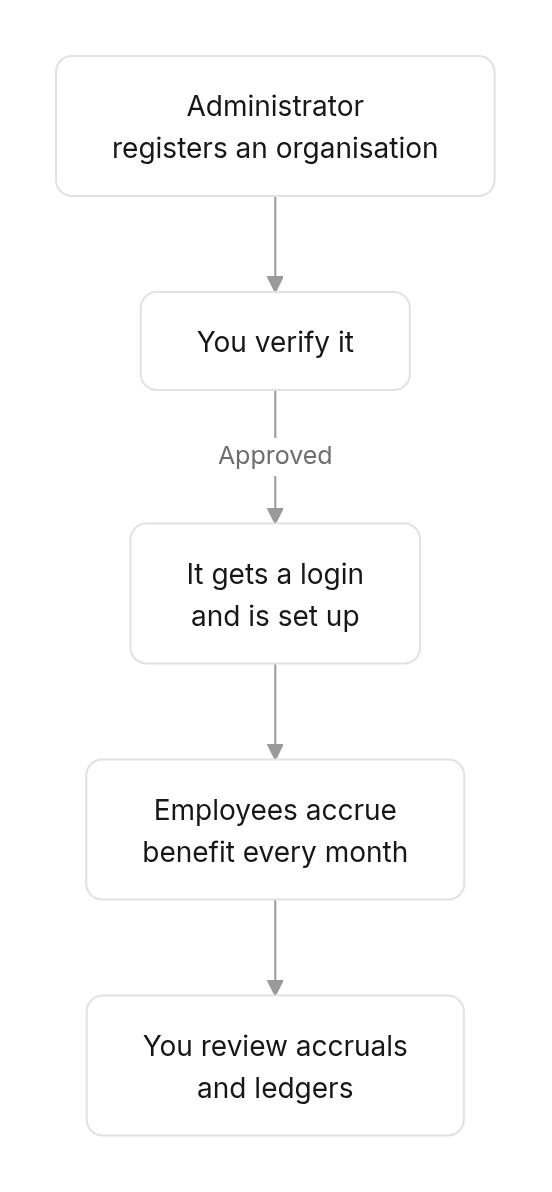
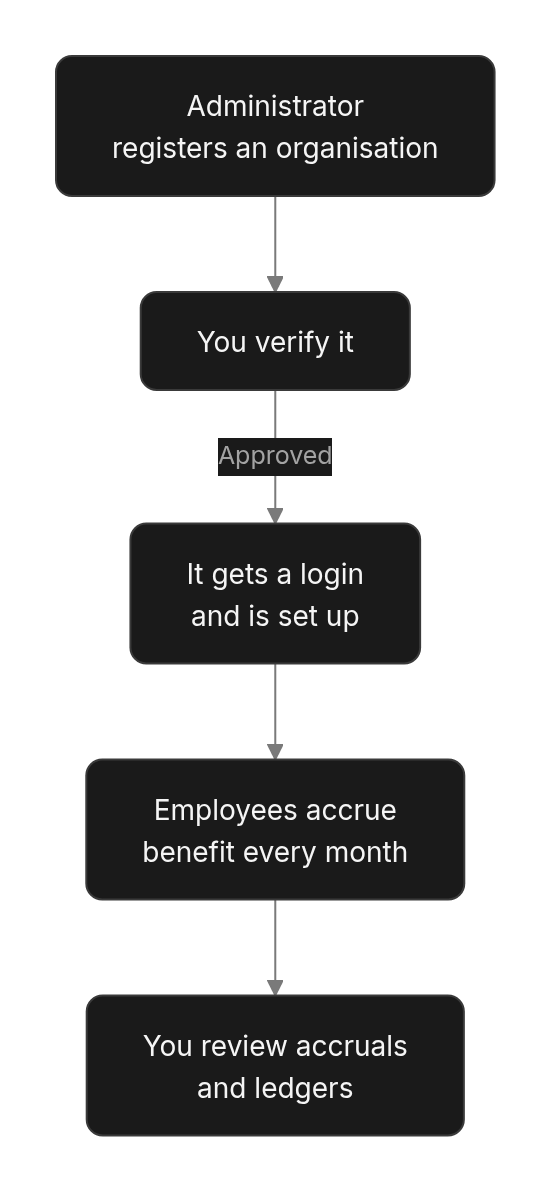
New to the platform? Start with [How the platform works](/concepts/how-it-works) and [Roles and responsibilities](/concepts/roles). Every workflow is drawn out under **How EOSB works**.
As a regulator officer at the Ministry of Employment, Labour and Social Security (MELSS) you do two things on the platform:
1. **Decide who may take part.** No employer, trustee or fund manager can start until you have verified it.
2. **Oversee the benefits employers owe.** You can see every active employer's liability, month by month and employee by employee.
Your oversight screens are read-only: you see everything, but you do not change records or move money.
## Where you fit
 | Who | What they do |
| - | - |
| **You (regulator)** | Verify registrations; review accruals, exceptions and employer ledgers. |
| **Platform administrator** | Registers organisations and submits them to you, sets employers up after you approve them, and fixes the data behind computation exceptions. |
| **Employers** | Register employees and fund their trusts. |
| **Trustees and fund managers** | Hold and invest the trust money. Each must be verified by you before it can be appointed to a trust. |
## Find what you need
1. [Set your password and sign in](/regulator/getting-started).
2. Learn the [verification queue](/regulator/employer-verification).
1. Work through [employer registrations](/regulator/employer-verification) waiting for a decision.
2. Check the [trustee and fund manager queues](/regulator/provider-verification).
3. Come back to any **deferred** cases you now have answers for.
Accruals run automatically just after each month ends.
1. Open [Monthly accruals](/regulator/monthly-accruals) for the month just closed and check the run **Completed**.
2. If **Exceptions** is above 0, list them under [Computation exceptions](/regulator/monthly-accruals#computation-exceptions) and send them to the platform administrator.
3. Spot-check employers in the [transaction ledger](/regulator/transaction-ledger) — for example, those with a low funding ratio.
| Situation | Go to |
| - | - |
| A registration needs a decision | [Verify employers](/regulator/employer-verification) or [Verify trustees and fund managers](/regulator/provider-verification) |
| You are waiting on another agency | [Defer verification](/regulator/employer-verification#record-your-decision) |
| An employer's liability looks wrong | [Transaction ledger](/regulator/transaction-ledger), then [the employee drill-down](/regulator/monthly-accruals#look-at-one-employers-employees) |
| You want to check how a benefit was calculated | [How benefits are calculated](/employer/how-benefits-are-calculated) |
| You see an error message | [Messages and what to do](/regulator/troubleshooting) |
## How to use this guide
Each page covers one screen, in the order of the menu. Pages start with **Where** (how to reach the screen), number their steps to match the red markers in the screenshots, and end with **What happens next**. Sections titled **Good to know** go deeper; skip them on a first read.
This documentation is built and hosted on [Mintlify](https://mintlify.com), a developer documentation platform.
| Who | What they do |
| - | - |
| **You (regulator)** | Verify registrations; review accruals, exceptions and employer ledgers. |
| **Platform administrator** | Registers organisations and submits them to you, sets employers up after you approve them, and fixes the data behind computation exceptions. |
| **Employers** | Register employees and fund their trusts. |
| **Trustees and fund managers** | Hold and invest the trust money. Each must be verified by you before it can be appointed to a trust. |
## Find what you need
1. [Set your password and sign in](/regulator/getting-started).
2. Learn the [verification queue](/regulator/employer-verification).
1. Work through [employer registrations](/regulator/employer-verification) waiting for a decision.
2. Check the [trustee and fund manager queues](/regulator/provider-verification).
3. Come back to any **deferred** cases you now have answers for.
Accruals run automatically just after each month ends.
1. Open [Monthly accruals](/regulator/monthly-accruals) for the month just closed and check the run **Completed**.
2. If **Exceptions** is above 0, list them under [Computation exceptions](/regulator/monthly-accruals#computation-exceptions) and send them to the platform administrator.
3. Spot-check employers in the [transaction ledger](/regulator/transaction-ledger) — for example, those with a low funding ratio.
| Situation | Go to |
| - | - |
| A registration needs a decision | [Verify employers](/regulator/employer-verification) or [Verify trustees and fund managers](/regulator/provider-verification) |
| You are waiting on another agency | [Defer verification](/regulator/employer-verification#record-your-decision) |
| An employer's liability looks wrong | [Transaction ledger](/regulator/transaction-ledger), then [the employee drill-down](/regulator/monthly-accruals#look-at-one-employers-employees) |
| You want to check how a benefit was calculated | [How benefits are calculated](/employer/how-benefits-are-calculated) |
| You see an error message | [Messages and what to do](/regulator/troubleshooting) |
## How to use this guide
Each page covers one screen, in the order of the menu. Pages start with **Where** (how to reach the screen), number their steps to match the red markers in the screenshots, and end with **What happens next**. Sections titled **Good to know** go deeper; skip them on a first read.
This documentation is built and hosted on [Mintlify](https://mintlify.com), a developer documentation platform.