> ## Documentation Index
> Fetch the complete documentation index at: https://docs.eosb.org/llms.txt
> Use this file to discover all available pages before exploring further.
# Monthly accruals
> Review how much end-of-service benefit each employer added in a month, down to each employee.
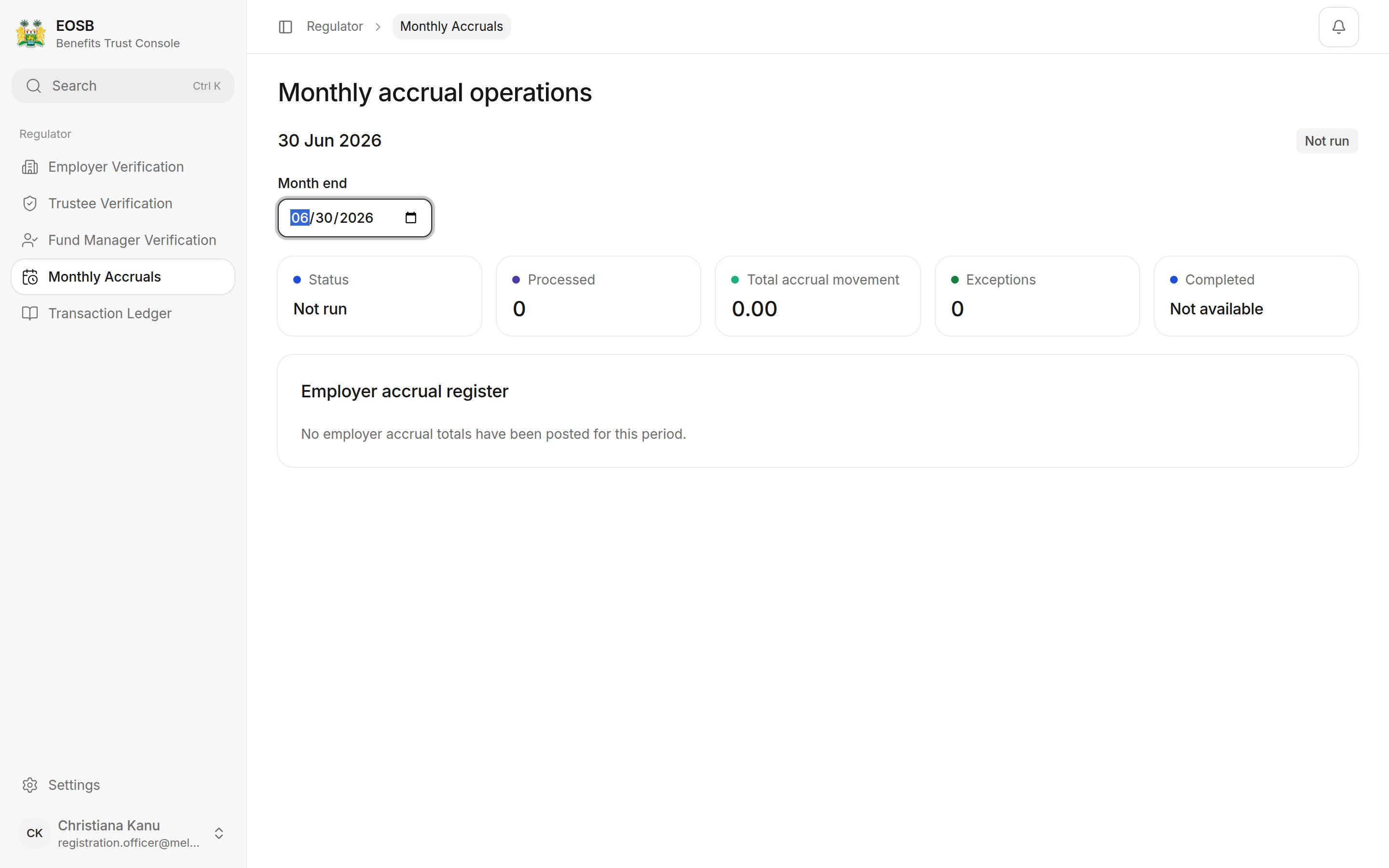
Each month the platform calculates every employee's cumulative benefit at the month-end. The difference from the previous month is the **monthly accrual**: the benefit employers took on that month. This screen is where you check it happened, and happened correctly.
**Where:** **Monthly Accruals** in the menu. It opens on the most recent month-end.
The calculation runs automatically the night after each month ends; if the platform was unavailable, it catches up the following night. The platform administrator can also run a month by hand. You review the results.
## Read a month
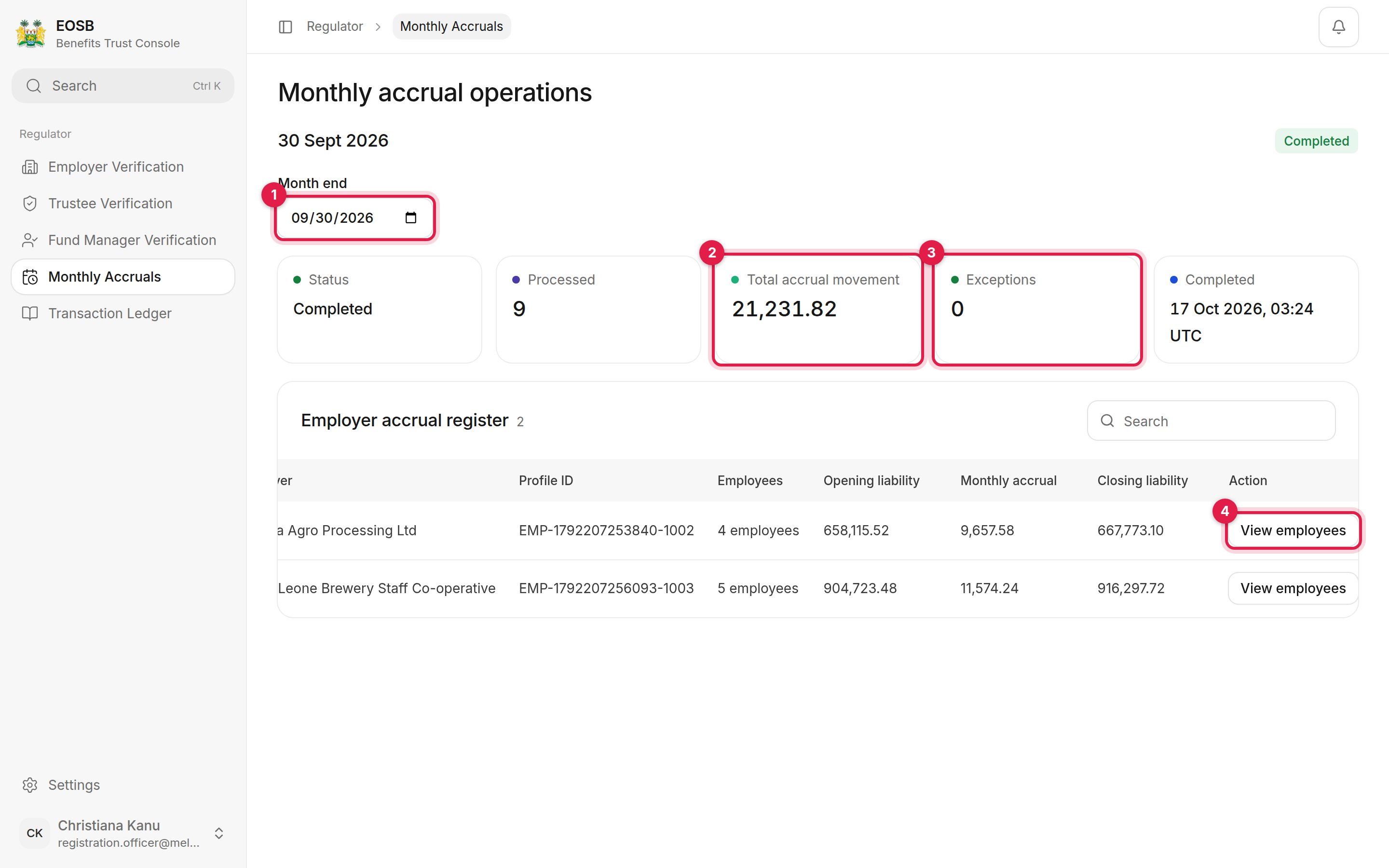 1. **Month end** — pick another month. Use the last day of a month.
2. **Total accrual movement** — the benefit added across all employers that month, in SLE.
3. **Exceptions** — employees who could not be calculated. Anything other than 0 needs following up; see [Computation exceptions](#computation-exceptions).
4. **View employees** — open one employer's employees for the month.
The other figures are the run's **Status**, how many employees were **Processed**, and when the run **Completed**. The **Employer accrual register** shows each employer's opening liability, monthly accrual and closing liability.
### Run statuses
| Status | Meaning |
| - | - |
| Not run | The month has not been calculated yet. |
| Processing | The calculation is running. |
| Completed | Every employee was calculated. |
| Completed with exceptions | Some employees could not be calculated, for example because their opening balance is missing. They are counted under **Exceptions**. |
| Failed | The run stopped. The error is shown under the figures. |
1. **Month end** — pick another month. Use the last day of a month.
2. **Total accrual movement** — the benefit added across all employers that month, in SLE.
3. **Exceptions** — employees who could not be calculated. Anything other than 0 needs following up; see [Computation exceptions](#computation-exceptions).
4. **View employees** — open one employer's employees for the month.
The other figures are the run's **Status**, how many employees were **Processed**, and when the run **Completed**. The **Employer accrual register** shows each employer's opening liability, monthly accrual and closing liability.
### Run statuses
| Status | Meaning |
| - | - |
| Not run | The month has not been calculated yet. |
| Processing | The calculation is running. |
| Completed | Every employee was calculated. |
| Completed with exceptions | Some employees could not be calculated, for example because their opening balance is missing. They are counted under **Exceptions**. |
| Failed | The run stopped. The error is shown under the figures. |
 ## Look at one employer's employees
Select **View employees** on an employer's row.
## Look at one employer's employees
Select **View employees** on an employer's row.
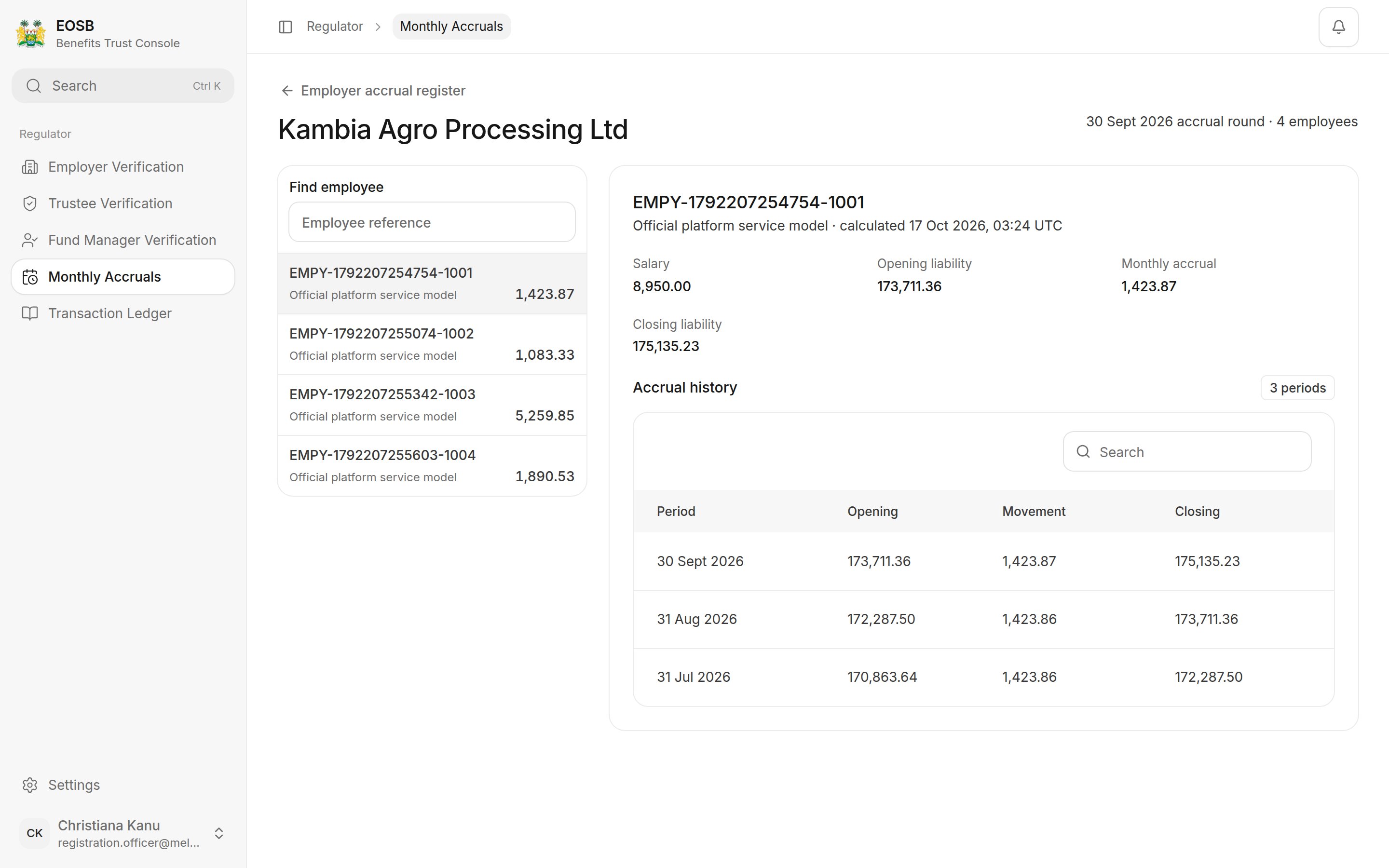 * On the left, **Find employee** searches by employee reference. Each employee shows their name, trust model and monthly accrual.
* On the right, the selected employee's name and reference, their **Salary**, **Opening liability**, **Monthly accrual** and **Closing liability**, and their **Accrual history** month by month.
Select **Employer accrual register** at the top to go back.
## Computation exceptions
Select **Computation Exceptions** to list the accrual records the monthly run could not finalise, for example because an employee's salary or opening balance is missing. The page opens on the last month-end; change **Month end** to look at another month.
Each row shows the period, employee, employer, the exception code, what it blocks, its review status and when it was raised. Follow up anything listed with the platform administrator, who corrects the source data so the next run can finalise it.
* **The run completed.** A month still **Not run** a few days after month-end is worth raising with the administrator.
* **Exceptions are 0.** Each exception is an employee whose benefit is missing from the totals, so the employer's liability is understated until it is fixed.
* **Movements are plausible.** An employer's accrual normally changes little from month to month. Large jumps usually mean new staff, pay rises or employees passing a work anniversary — check in the employee view. The formula is explained in [How benefits are calculated](/employer/how-benefits-are-calculated).
**Next:** [transaction ledger](/regulator/transaction-ledger).
This documentation is built and hosted on [Mintlify](https://mintlify.com), a developer documentation platform.
* On the left, **Find employee** searches by employee reference. Each employee shows their name, trust model and monthly accrual.
* On the right, the selected employee's name and reference, their **Salary**, **Opening liability**, **Monthly accrual** and **Closing liability**, and their **Accrual history** month by month.
Select **Employer accrual register** at the top to go back.
## Computation exceptions
Select **Computation Exceptions** to list the accrual records the monthly run could not finalise, for example because an employee's salary or opening balance is missing. The page opens on the last month-end; change **Month end** to look at another month.
Each row shows the period, employee, employer, the exception code, what it blocks, its review status and when it was raised. Follow up anything listed with the platform administrator, who corrects the source data so the next run can finalise it.
* **The run completed.** A month still **Not run** a few days after month-end is worth raising with the administrator.
* **Exceptions are 0.** Each exception is an employee whose benefit is missing from the totals, so the employer's liability is understated until it is fixed.
* **Movements are plausible.** An employer's accrual normally changes little from month to month. Large jumps usually mean new staff, pay rises or employees passing a work anniversary — check in the employee view. The formula is explained in [How benefits are calculated](/employer/how-benefits-are-calculated).
**Next:** [transaction ledger](/regulator/transaction-ledger).
This documentation is built and hosted on [Mintlify](https://mintlify.com), a developer documentation platform.