> ## Documentation Index
> Fetch the complete documentation index at: https://docs.eosb.org/llms.txt
> Use this file to discover all available pages before exploring further.
# Start here
> What a fund manager does on the EOSB platform, how cash moves through your mandates, and how to use this guide.
New to the platform? Start with [How the platform works](/concepts/how-it-works) and [Roles and responsibilities](/concepts/roles). Every workflow is drawn out under **How EOSB works**.
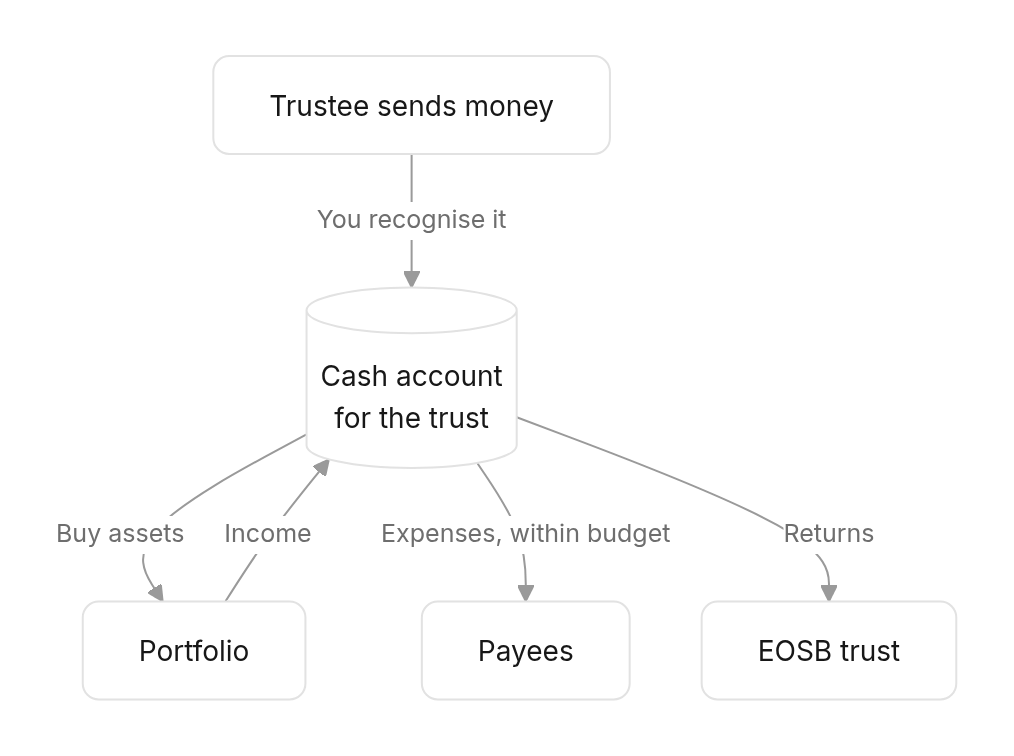
As a fund manager you invest the money a trustee sends you from each EOSB trust. You hold that money as a **cash account per trust** (a mandate), and everything you do moves money in or out of one of those accounts:
* **In:** cash you [recognise](/fund-manager/cash-recognition) from the trustee, and [income](/fund-manager/assets#record-income) your assets earn.
* **Out:** [assets you buy](/fund-manager/assets#add-an-asset), [expenses you pay](/fund-manager/expenses) and [money you return](/fund-manager/transfers-to-trust) to the trust.
Every movement is recorded with evidence and, where money moves, confirmed with a one-time code.
## How cash moves through a mandate
 | Who | What they do for you |
| - | - |
| **Trustee** | Sends you money, approves recognitions that differ from what was sent, approves expenses above SLE 100,000, confirms money you return. |
| **Trustee or employer** | Approves your expense budgets. Whichever decides first settles it. |
| **Platform administrator** | Assigns benchmarks to your portfolios. |
## Find what you need
Do these once per trust, in order.
1. [Sign in and find your mandates](/fund-manager/getting-started).
2. [Create and activate a portfolio framework](/fund-manager/portfolio-frameworks) — the policy mix for the trust.
3. [Propose an expense budget](/fund-manager/expenses#propose-a-budget) and wait for approval.
4. Ask the platform administrator to assign a benchmark to the portfolio, so returns can be compared.
1. [Recognise cash](/fund-manager/cash-recognition) from new trustee transfers.
2. [Buy assets](/fund-manager/assets#add-an-asset) and [record income](/fund-manager/assets#record-income) as it arrives.
3. [Post expenses](/fund-manager/expenses#record-an-expense) against the approved budget.
At each month-end:
1. [Record valuations](/fund-manager/assets#record-a-change-in-value) so assets carry their current value.
2. [Create the month-end snapshot](/fund-manager/assets#the-asset-register) of the asset register — the trustee's reports and ROI are built from it.
3. [Create a variance snapshot](/fund-manager/allocations-and-roi#allocations) and rebalance anything outside tolerance.
4. [Reconcile the statement of account](/fund-manager/statement-of-account) for each trust.
| Situation | Go to |
| - | - |
| Less arrived than the trustee sent | [A different amount arrived](/fund-manager/cash-recognition#a-different-amount-arrived) |
| Money arrived with no transfer logged | [Manual recognition](/fund-manager/cash-recognition#manual-recognition) |
| An expense is blocked as over budget | [When the budget is not enough](/fund-manager/expenses#when-the-budget-is-not-enough) |
| The trust needs cash to pay benefits | [Return money to the trust](/fund-manager/transfers-to-trust) |
| An asset has lost all its value | [Write off an asset](/fund-manager/assets#write-off-an-asset) |
| The statement says **Out of balance** | [Statement of account](/fund-manager/statement-of-account) |
Your login is created when the regulator verifies your organisation. The username is your registration reference in lower case, and your contact person is emailed a link to set the password; see [Set your password](/employer/getting-started/set-password).
| Term | Meaning |
| - | - |
| Mandate / cash account | The money you hold for one trust. Each trust's cash is kept separate. |
| Recognition | Your confirmation of how much of a trustee transfer arrived. Until you recognise it, you cannot use the money. |
| Outstanding receipt | Part of a transfer that has not arrived yet but is still expected. |
| Portfolio framework | A trust's portfolio and its policy mix: which asset types, in what proportions. |
| Policy allocation | The agreed percentage for each asset type. It must total 100%. |
| Carrying value | What an asset is currently recorded as worth. Valuations change it; cash does not move. |
| Month-end snapshot | A frozen copy of the asset register at month-end. Reports and ROI use it. |
| Expense budget | Your plan for a trust's running costs. You can only spend within an approved one. |
This documentation is built and hosted on [Mintlify](https://mintlify.com), a developer documentation platform.
| Who | What they do for you |
| - | - |
| **Trustee** | Sends you money, approves recognitions that differ from what was sent, approves expenses above SLE 100,000, confirms money you return. |
| **Trustee or employer** | Approves your expense budgets. Whichever decides first settles it. |
| **Platform administrator** | Assigns benchmarks to your portfolios. |
## Find what you need
Do these once per trust, in order.
1. [Sign in and find your mandates](/fund-manager/getting-started).
2. [Create and activate a portfolio framework](/fund-manager/portfolio-frameworks) — the policy mix for the trust.
3. [Propose an expense budget](/fund-manager/expenses#propose-a-budget) and wait for approval.
4. Ask the platform administrator to assign a benchmark to the portfolio, so returns can be compared.
1. [Recognise cash](/fund-manager/cash-recognition) from new trustee transfers.
2. [Buy assets](/fund-manager/assets#add-an-asset) and [record income](/fund-manager/assets#record-income) as it arrives.
3. [Post expenses](/fund-manager/expenses#record-an-expense) against the approved budget.
At each month-end:
1. [Record valuations](/fund-manager/assets#record-a-change-in-value) so assets carry their current value.
2. [Create the month-end snapshot](/fund-manager/assets#the-asset-register) of the asset register — the trustee's reports and ROI are built from it.
3. [Create a variance snapshot](/fund-manager/allocations-and-roi#allocations) and rebalance anything outside tolerance.
4. [Reconcile the statement of account](/fund-manager/statement-of-account) for each trust.
| Situation | Go to |
| - | - |
| Less arrived than the trustee sent | [A different amount arrived](/fund-manager/cash-recognition#a-different-amount-arrived) |
| Money arrived with no transfer logged | [Manual recognition](/fund-manager/cash-recognition#manual-recognition) |
| An expense is blocked as over budget | [When the budget is not enough](/fund-manager/expenses#when-the-budget-is-not-enough) |
| The trust needs cash to pay benefits | [Return money to the trust](/fund-manager/transfers-to-trust) |
| An asset has lost all its value | [Write off an asset](/fund-manager/assets#write-off-an-asset) |
| The statement says **Out of balance** | [Statement of account](/fund-manager/statement-of-account) |
Your login is created when the regulator verifies your organisation. The username is your registration reference in lower case, and your contact person is emailed a link to set the password; see [Set your password](/employer/getting-started/set-password).
| Term | Meaning |
| - | - |
| Mandate / cash account | The money you hold for one trust. Each trust's cash is kept separate. |
| Recognition | Your confirmation of how much of a trustee transfer arrived. Until you recognise it, you cannot use the money. |
| Outstanding receipt | Part of a transfer that has not arrived yet but is still expected. |
| Portfolio framework | A trust's portfolio and its policy mix: which asset types, in what proportions. |
| Policy allocation | The agreed percentage for each asset type. It must total 100%. |
| Carrying value | What an asset is currently recorded as worth. Valuations change it; cash does not move. |
| Month-end snapshot | A frozen copy of the asset register at month-end. Reports and ROI use it. |
| Expense budget | Your plan for a trust's running costs. You can only spend within an approved one. |
This documentation is built and hosted on [Mintlify](https://mintlify.com), a developer documentation platform.