> ## Documentation Index
> Fetch the complete documentation index at: https://docs.eosb.org/llms.txt
> Use this file to discover all available pages before exploring further.
# Start here
> What an employer does on the EOSB platform, how the pieces fit together, and how to use this guide.
New to the platform? Start with [How the platform works](/concepts/how-it-works) and [Roles and responsibilities](/concepts/roles). Every workflow is drawn out under **How EOSB works**.
As an employer you do three things on the platform:
1. **Keep a record of every employee** who earns an end-of-service benefit (EOSB).
2. **Pay money into your EOSB trust**, the account that holds those benefits.
3. **Approve the budgets** your fund manager asks for to run the trust.
Everything else — calculating benefits, confirming payments, investing the money — is done by the platform or by the other organisations linked to your trust. You can follow all of it from your workspace.
## How the pieces fit together
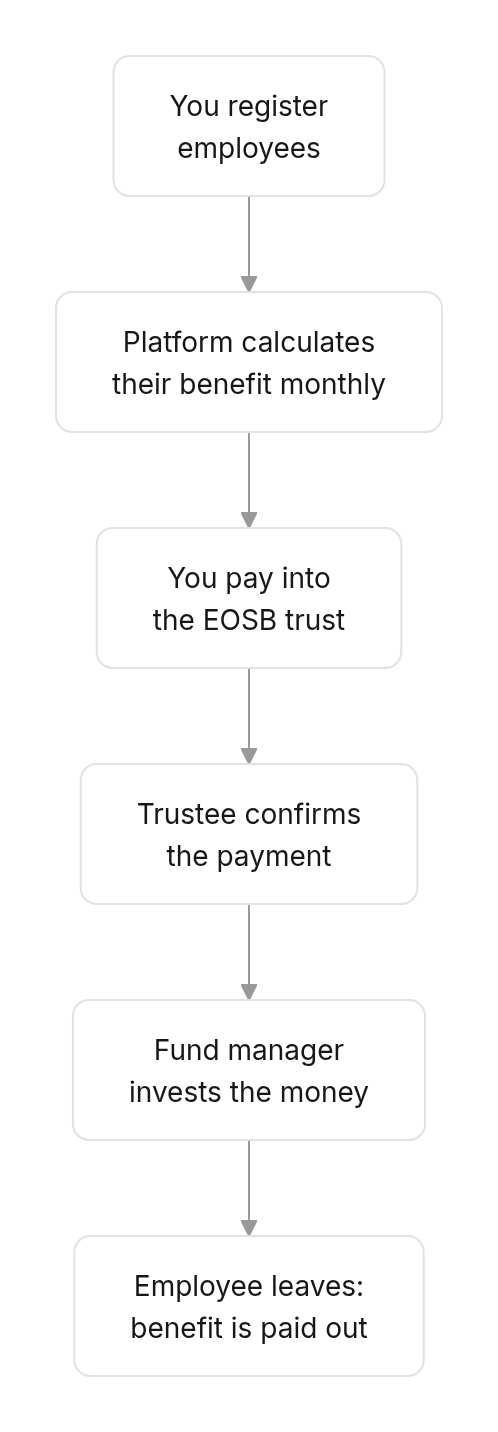
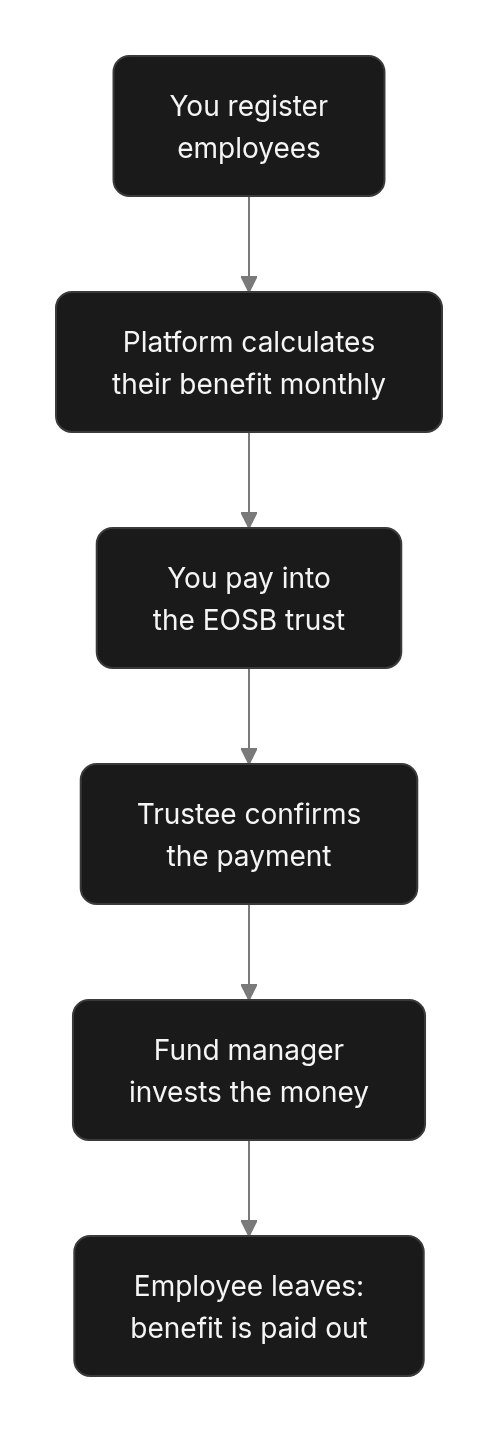 | Who | What they do for you |
| - | - |
| **You (employer)** | Register employees, keep their records current, pay into the trust, approve fund manager budgets. |
| **Platform administrator** | Registers your organisation, sets up your trust, approves salary and payment changes, pays out benefits. |
| **Regulator (MELSS)** | Verifies your organisation before you get an account. |
| **Trustee** | Confirms each payment you make into the trust, and approves benefit payments when an employee leaves. |
| **Fund manager** | Invests the trust's money and pays its running costs from budgets you approve. |
## Find what you need
Do these once, in order.
1. [Set your password](/employer/getting-started/set-password) from the account email.
2. [Sign in and learn the workspace](/employer/getting-started/sign-in).
3. [Follow your activation](/employer/activation) until your status is **Active**.
4. Add your employees: [one at a time](/employer/employees/register) or [from a CSV file](/employer/employees/bulk-upload).
5. [Make your first payment into the trust](/employer/funding).
A short routine that keeps your record accurate.
1. Check the [Overview](/employer/overview-tab) — employees, liability and funding ratio.
2. Add new starters and [record leavers](/employer/employees/termination).
3. Pay into the trust and check the trustee has [confirmed it](/employer/funding#funding-history).
4. Decide any [budgets waiting for you](/employer/budget-approvals).
5. Look over the [transaction ledger](/employer/transaction-ledger) for the month just closed.
| Situation | Go to |
| - | - |
| Someone joins | [Register an employee](/employer/employees/register) |
| Someone gets a pay rise or changes bank | [Update employee records](/employer/employees/update-records) |
| Someone leaves | [Terminate an employee](/employer/employees/termination) |
| You paid into the trust | [Submit a funding proof](/employer/funding#submit-a-funding-proof) |
| The trustee rejected a payment | [Payment statuses](/employer/funding#payment-statuses) |
| The fund manager sent a budget | [Approve fund manager budgets](/employer/budget-approvals) |
| You want to know why a number changed | [How benefits are calculated](/employer/how-benefits-are-calculated) |
| You see an error message | [Messages and what to do](/employer/troubleshooting) |
## How to use this guide
The guide follows the workspace from left to right: each page covers one screen. Every page has the same shape:
* **Where** — how to reach the screen.
* **Before you start** — anything that must already be in place.
* **Steps** — numbered to match the red markers in the screenshots.
* **What happens next** — what the platform and the other organisations do after you act.
Sections titled **Good to know** go deeper — how amounts are worked out, why a change needs approval. You can skip them on a first read and come back when you need them.
New to the words used here? See [Key terms](/employer/key-terms).
This documentation is built and hosted on [Mintlify](https://mintlify.com), a developer documentation platform.
| Who | What they do for you |
| - | - |
| **You (employer)** | Register employees, keep their records current, pay into the trust, approve fund manager budgets. |
| **Platform administrator** | Registers your organisation, sets up your trust, approves salary and payment changes, pays out benefits. |
| **Regulator (MELSS)** | Verifies your organisation before you get an account. |
| **Trustee** | Confirms each payment you make into the trust, and approves benefit payments when an employee leaves. |
| **Fund manager** | Invests the trust's money and pays its running costs from budgets you approve. |
## Find what you need
Do these once, in order.
1. [Set your password](/employer/getting-started/set-password) from the account email.
2. [Sign in and learn the workspace](/employer/getting-started/sign-in).
3. [Follow your activation](/employer/activation) until your status is **Active**.
4. Add your employees: [one at a time](/employer/employees/register) or [from a CSV file](/employer/employees/bulk-upload).
5. [Make your first payment into the trust](/employer/funding).
A short routine that keeps your record accurate.
1. Check the [Overview](/employer/overview-tab) — employees, liability and funding ratio.
2. Add new starters and [record leavers](/employer/employees/termination).
3. Pay into the trust and check the trustee has [confirmed it](/employer/funding#funding-history).
4. Decide any [budgets waiting for you](/employer/budget-approvals).
5. Look over the [transaction ledger](/employer/transaction-ledger) for the month just closed.
| Situation | Go to |
| - | - |
| Someone joins | [Register an employee](/employer/employees/register) |
| Someone gets a pay rise or changes bank | [Update employee records](/employer/employees/update-records) |
| Someone leaves | [Terminate an employee](/employer/employees/termination) |
| You paid into the trust | [Submit a funding proof](/employer/funding#submit-a-funding-proof) |
| The trustee rejected a payment | [Payment statuses](/employer/funding#payment-statuses) |
| The fund manager sent a budget | [Approve fund manager budgets](/employer/budget-approvals) |
| You want to know why a number changed | [How benefits are calculated](/employer/how-benefits-are-calculated) |
| You see an error message | [Messages and what to do](/employer/troubleshooting) |
## How to use this guide
The guide follows the workspace from left to right: each page covers one screen. Every page has the same shape:
* **Where** — how to reach the screen.
* **Before you start** — anything that must already be in place.
* **Steps** — numbered to match the red markers in the screenshots.
* **What happens next** — what the platform and the other organisations do after you act.
Sections titled **Good to know** go deeper — how amounts are worked out, why a change needs approval. You can skip them on a first read and come back when you need them.
New to the words used here? See [Key terms](/employer/key-terms).
This documentation is built and hosted on [Mintlify](https://mintlify.com), a developer documentation platform.