> ## Documentation Index
> Fetch the complete documentation index at: https://docs.eosb.org/llms.txt
> Use this file to discover all available pages before exploring further.
# The Overview tab
> Your headline figures and the organisations that manage your trust, on one screen.
The Overview tab is where your workspace opens. Use it as a quick health check: how many employees you have, what you owe them, and how much of that is already in the trust.
**Where:** Employer › **Overview** tab. It opens automatically when you sign in.
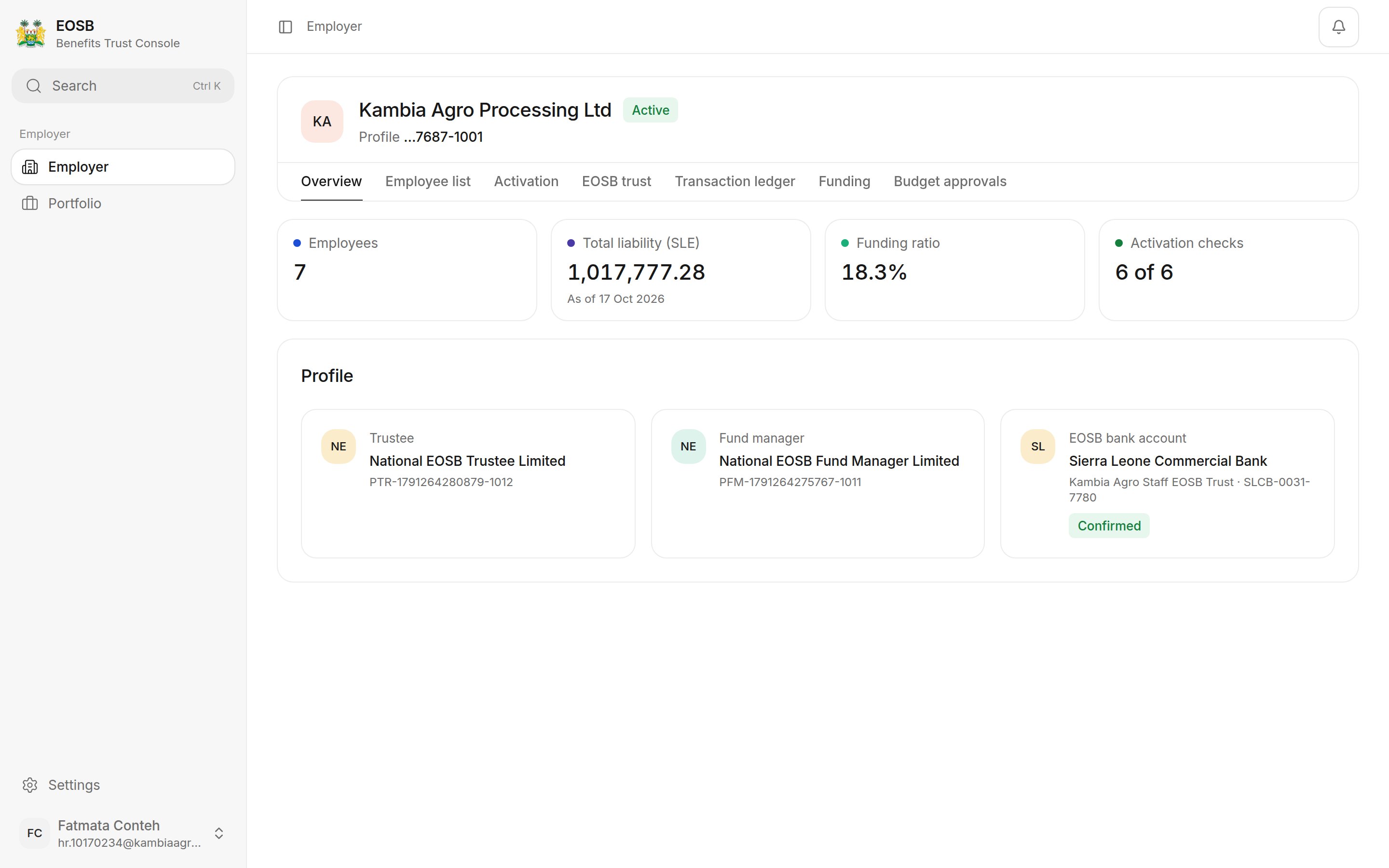 ## Headline figures
| Figure | What it tells you | Where to see the detail |
| - | - | - |
| **Employees** | How many employees are registered under your organisation. | [Employee directory](/employer/employees/directory) |
| **Total liability (SLE)** | What you would owe if every employee left today, with the date it was calculated. | [Transaction ledger](/employer/transaction-ledger) |
| **Funding ratio** | How much of that liability is already in the trust. | [Funding](/employer/funding) |
| **Activation checks** | How many setup checks have passed, for example **6 of 6**. | [Activation](/employer/activation) |
## Profile
The three tiles show who looks after your employees' benefits:
* **Trustee** — confirms your payments and approves benefit payouts.
* **Fund manager** — invests the trust's money.
* **EOSB bank account** — the trust's bank account. **Pay into this account** when you fund the trust. **Confirmed** means the administrator has checked it.
Each tile shows the organisation's reference number. Quote it if you contact them.
The funding ratio is the **funded amount** (payments the trustee has confirmed, plus investment income) divided by your **total liability**. In the example, 18.3% means the trust holds about SLE 18 for every SLE 100 owed.
The ratio goes **up** when the trustee confirms a payment, and goes **down** a little after each month ends, because employees have earned another month of benefit. A payment you have submitted but the trustee has not yet confirmed does not count. See [How benefits are calculated](/employer/how-benefits-are-calculated).
**Next:** [your employees](/employer/employees/directory).
This documentation is built and hosted on [Mintlify](https://mintlify.com), a developer documentation platform.
## Headline figures
| Figure | What it tells you | Where to see the detail |
| - | - | - |
| **Employees** | How many employees are registered under your organisation. | [Employee directory](/employer/employees/directory) |
| **Total liability (SLE)** | What you would owe if every employee left today, with the date it was calculated. | [Transaction ledger](/employer/transaction-ledger) |
| **Funding ratio** | How much of that liability is already in the trust. | [Funding](/employer/funding) |
| **Activation checks** | How many setup checks have passed, for example **6 of 6**. | [Activation](/employer/activation) |
## Profile
The three tiles show who looks after your employees' benefits:
* **Trustee** — confirms your payments and approves benefit payouts.
* **Fund manager** — invests the trust's money.
* **EOSB bank account** — the trust's bank account. **Pay into this account** when you fund the trust. **Confirmed** means the administrator has checked it.
Each tile shows the organisation's reference number. Quote it if you contact them.
The funding ratio is the **funded amount** (payments the trustee has confirmed, plus investment income) divided by your **total liability**. In the example, 18.3% means the trust holds about SLE 18 for every SLE 100 owed.
The ratio goes **up** when the trustee confirms a payment, and goes **down** a little after each month ends, because employees have earned another month of benefit. A payment you have submitted but the trustee has not yet confirmed does not count. See [How benefits are calculated](/employer/how-benefits-are-calculated).
**Next:** [your employees](/employer/employees/directory).
This documentation is built and hosted on [Mintlify](https://mintlify.com), a developer documentation platform.