> ## Documentation Index
> Fetch the complete documentation index at: https://docs.eosb.org/llms.txt
> Use this file to discover all available pages before exploring further.
# The employee lifecycle
> From registration to payout: what happens to an employee's record and benefit at each step, and who is responsible.
An employee's record has two parts that move together: **who they are** (identity, contact, job, salary, payout account) and **what they are owed** (their accrued benefit). This page follows both from the day they are registered to the day they are paid.
## The whole journey
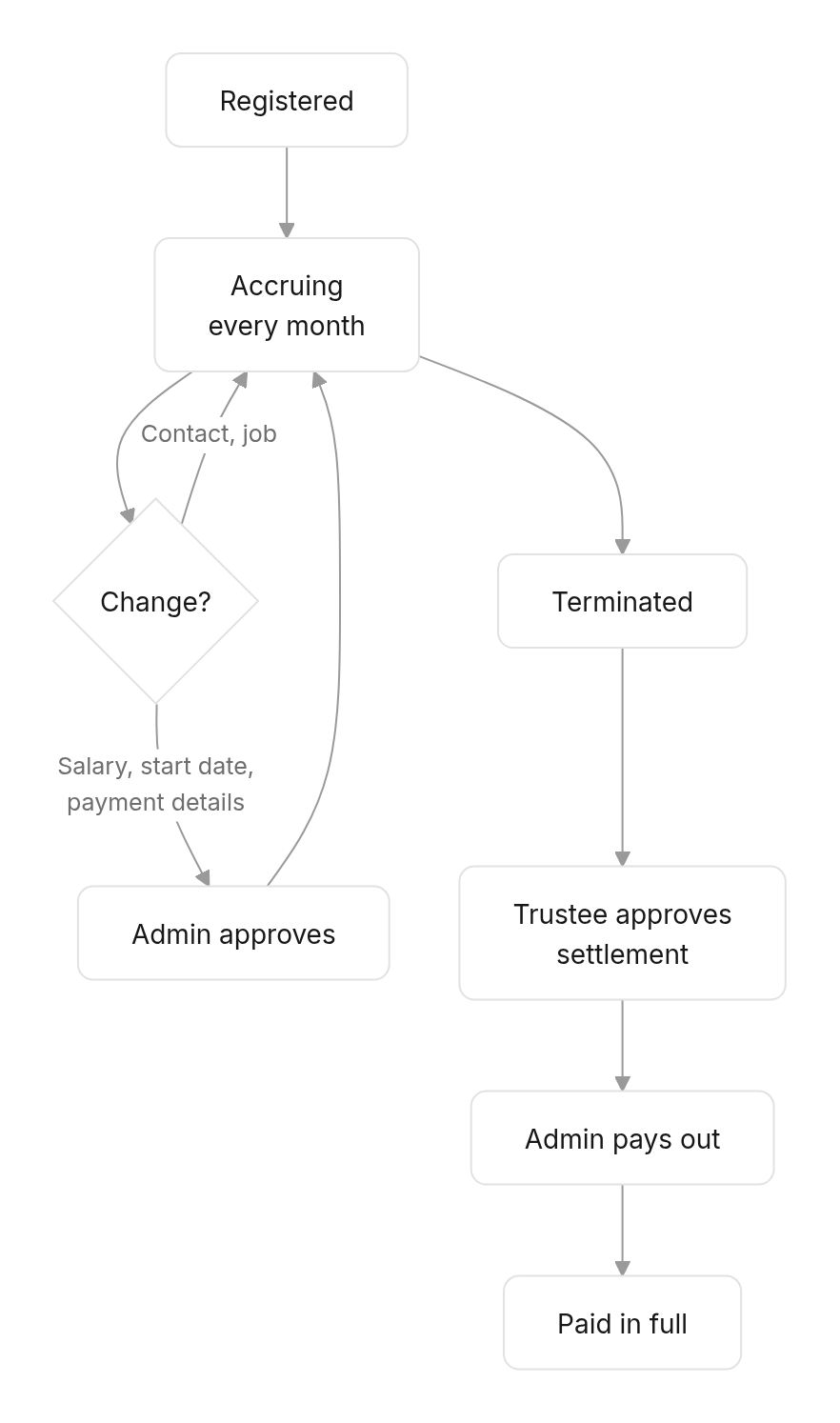
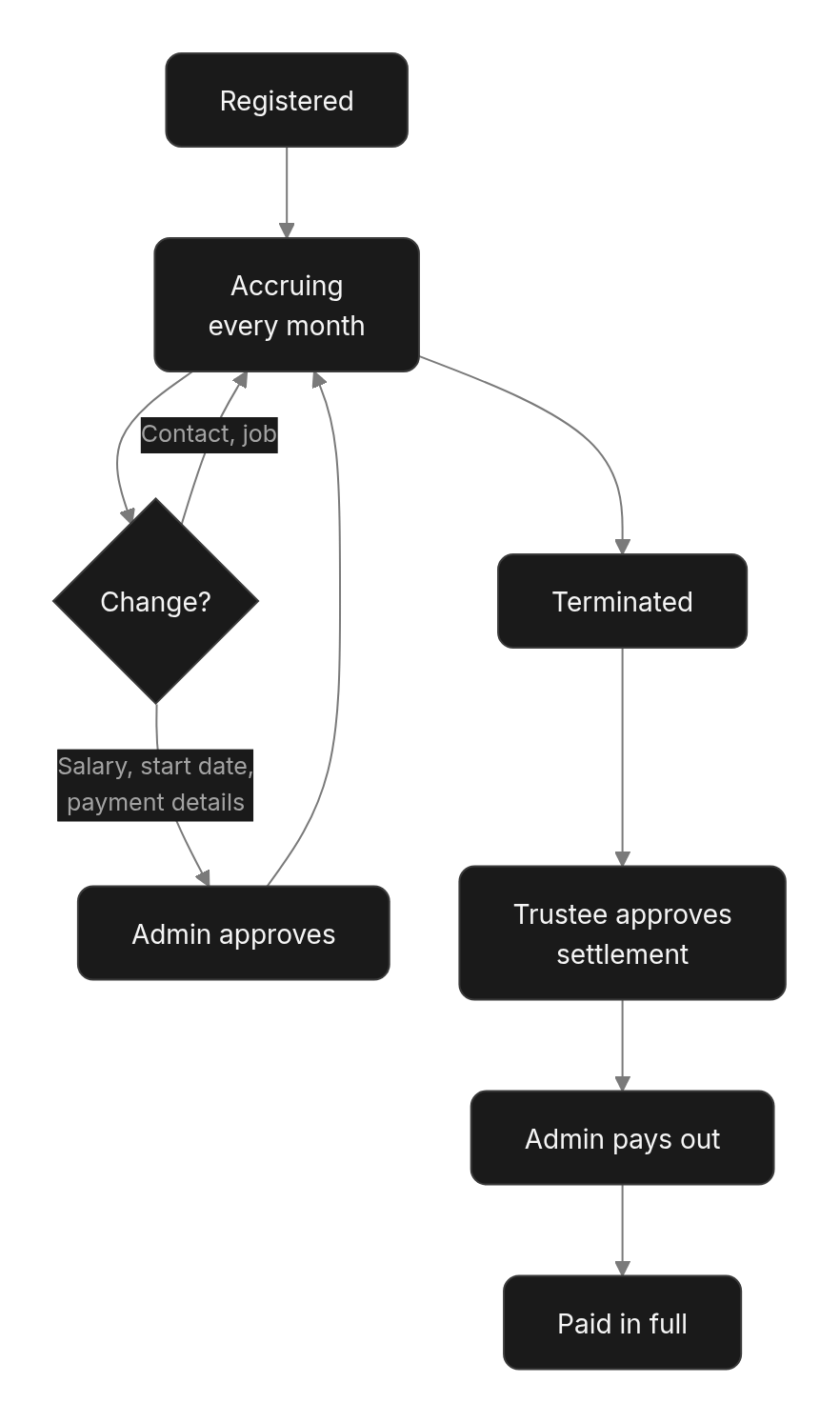 ## 1. Registration
**Who:** the employer, or the administrator on their behalf. **How:** [one at a time](/employer/employees/register) or [bulk upload](/employer/employees/bulk-upload). **Requires:** the employer to be **Active**.
On submission, the platform does four things automatically:
| | What | Why |
| - | - | - |
| 1 | Gives the employee an ID (`EMPY-…`) and status **Registered**. | So every later entry can be traced to them. |
| 2 | Assigns them to the employer's active EOSB trust. | Their benefit must be held somewhere. |
| 3 | Calculates their **opening balance** — the benefit earned from their start date up to the last month-end. | So service before the platform is not lost. |
| 4 | Opens a **SmartPay wallet** on their phone number and notifies them. | So there is always somewhere to pay the benefit. |
A registration can be saved as a **draft** at any point. A draft earns nothing and is not an employee until it is submitted.
## 2. Every month
The night after each month ends, the platform recalculates every registered employee's benefit and posts the increase to the employer's ledger as a **monthly accrual**. Nobody needs to start it. See [Liability and accruals](/concepts/liability-and-accruals).
## 3. Changes to the record
Changes fall into two groups, depending on whether they affect **how much** the employee is owed or **where** it is paid.
| Change | Applies | Why |
| - | - | - |
| Contact email and phone, job title, category, branch/location | **Straight away** | Does not affect the benefit. |
| Salary (with its effective date), start date | **After admin approval** | Changes the benefit, including for past service. |
| Payment details (account type, provider, account number) | **After admin approval** | Decides where the money goes. |
| Employee ID, NASSIT number, trust | Cannot be changed by the employer | Ask the platform administrator. |
## 1. Registration
**Who:** the employer, or the administrator on their behalf. **How:** [one at a time](/employer/employees/register) or [bulk upload](/employer/employees/bulk-upload). **Requires:** the employer to be **Active**.
On submission, the platform does four things automatically:
| | What | Why |
| - | - | - |
| 1 | Gives the employee an ID (`EMPY-…`) and status **Registered**. | So every later entry can be traced to them. |
| 2 | Assigns them to the employer's active EOSB trust. | Their benefit must be held somewhere. |
| 3 | Calculates their **opening balance** — the benefit earned from their start date up to the last month-end. | So service before the platform is not lost. |
| 4 | Opens a **SmartPay wallet** on their phone number and notifies them. | So there is always somewhere to pay the benefit. |
A registration can be saved as a **draft** at any point. A draft earns nothing and is not an employee until it is submitted.
## 2. Every month
The night after each month ends, the platform recalculates every registered employee's benefit and posts the increase to the employer's ledger as a **monthly accrual**. Nobody needs to start it. See [Liability and accruals](/concepts/liability-and-accruals).
## 3. Changes to the record
Changes fall into two groups, depending on whether they affect **how much** the employee is owed or **where** it is paid.
| Change | Applies | Why |
| - | - | - |
| Contact email and phone, job title, category, branch/location | **Straight away** | Does not affect the benefit. |
| Salary (with its effective date), start date | **After admin approval** | Changes the benefit, including for past service. |
| Payment details (account type, provider, account number) | **After admin approval** | Decides where the money goes. |
| Employee ID, NASSIT number, trust | Cannot be changed by the employer | Ask the platform administrator. |
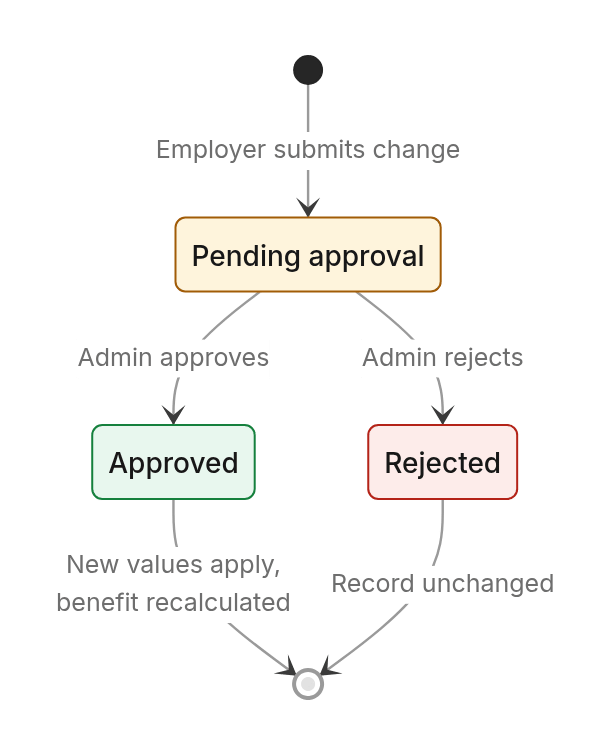
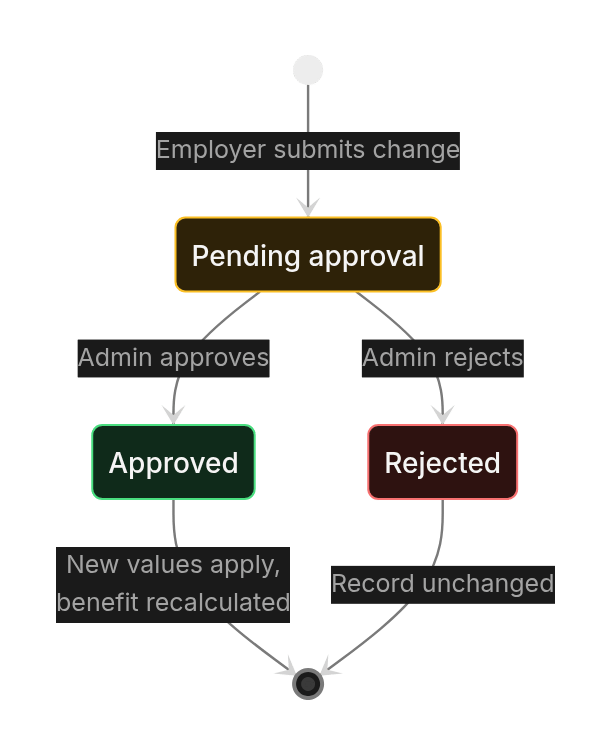 A change request has a reference starting **EUR-** and is expected to be decided within **3 days**. Until then, the record keeps its old values.
## 4. The payout account
| Status | Meaning | Can be paid? |
| - | - | - |
| Not provided | No payout account recorded. | No |
| Pending verification | A bank or mobile money account was entered and has not been verified yet. | No |
| Verified | The account is confirmed. A SmartPay wallet opened by the platform is verified straight away. | **Yes** |
| Rejected | The account could not be verified. Enter a corrected one. | No |
Check the payout account **before** terminating an employee. Once terminated, the record is **locked**: nothing on it can be changed, including payment details. A benefit cannot be paid until the account is verified. Where SmartPay wallets are switched on, the platform opens a wallet on the employee's registered phone before paying, so a correct phone number matters too.
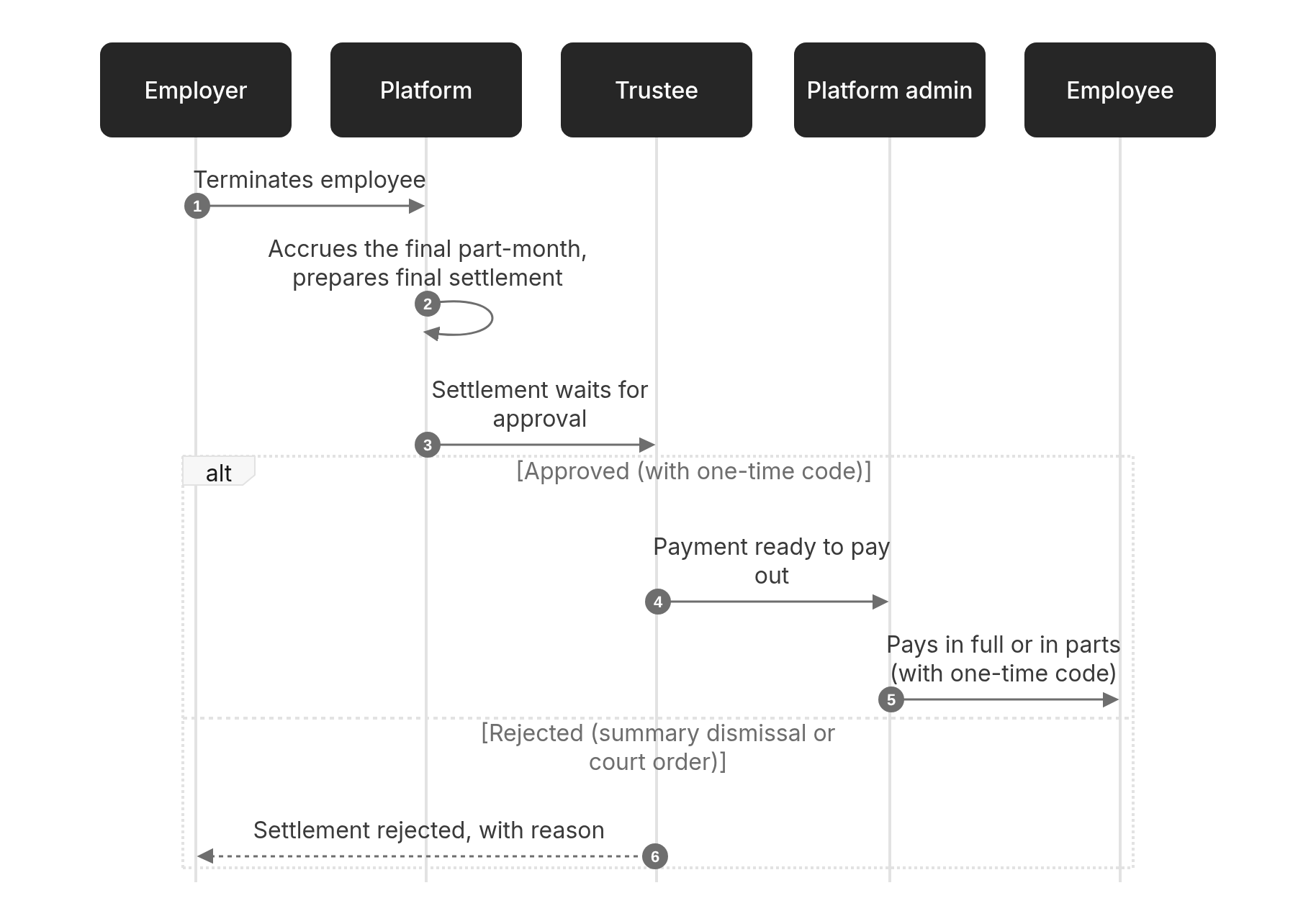
## 5. Termination and settlement
**Who:** the employer (or administrator). **Reasons:** resignation, retirement, dismissal or end of contract. The termination date cannot be in the future, and termination cannot be undone.
A change request has a reference starting **EUR-** and is expected to be decided within **3 days**. Until then, the record keeps its old values.
## 4. The payout account
| Status | Meaning | Can be paid? |
| - | - | - |
| Not provided | No payout account recorded. | No |
| Pending verification | A bank or mobile money account was entered and has not been verified yet. | No |
| Verified | The account is confirmed. A SmartPay wallet opened by the platform is verified straight away. | **Yes** |
| Rejected | The account could not be verified. Enter a corrected one. | No |
Check the payout account **before** terminating an employee. Once terminated, the record is **locked**: nothing on it can be changed, including payment details. A benefit cannot be paid until the account is verified. Where SmartPay wallets are switched on, the platform opens a wallet on the employee's registered phone before paying, so a correct phone number matters too.
## 5. Termination and settlement
**Who:** the employer (or administrator). **Reasons:** resignation, retirement, dismissal or end of contract. The termination date cannot be in the future, and termination cannot be undone.
 ### Settlement statuses
| Status | Meaning | Who acts next |
| - | - | - |
| Pending calculation | The platform is working out the amount. | Platform |
| Awaiting trustee approval | The amount is ready for the trustee. Expected within **2 days**. | Trustee |
| Approved | The trustee approved it. It is in the payout queue. Expected within **1 day**. | Admin |
| Rejected | The trustee refused it, for a recognised legal reason only. | — |
| Part payment | Some has been paid; the rest is outstanding. | Admin |
| Paid in full | Everything has been paid. | — |
The amount is the employee's whole accrued benefit up to the termination date, not a multiple of salary. Once paid, it no longer counts in the employer's liability.
## Employee statuses
| Status | Meaning |
| - | - |
| Registered | A current employee. Benefit accrues every month. |
| Terminated | Service has ended. No further accrual; settlement in progress or complete. |
This documentation is built and hosted on [Mintlify](https://mintlify.com), a developer documentation platform.
### Settlement statuses
| Status | Meaning | Who acts next |
| - | - | - |
| Pending calculation | The platform is working out the amount. | Platform |
| Awaiting trustee approval | The amount is ready for the trustee. Expected within **2 days**. | Trustee |
| Approved | The trustee approved it. It is in the payout queue. Expected within **1 day**. | Admin |
| Rejected | The trustee refused it, for a recognised legal reason only. | — |
| Part payment | Some has been paid; the rest is outstanding. | Admin |
| Paid in full | Everything has been paid. | — |
The amount is the employee's whole accrued benefit up to the termination date, not a multiple of salary. Once paid, it no longer counts in the employer's liability.
## Employee statuses
| Status | Meaning |
| - | - |
| Registered | A current employee. Benefit accrues every month. |
| Terminated | Service has ended. No further accrual; settlement in progress or complete. |
This documentation is built and hosted on [Mintlify](https://mintlify.com), a developer documentation platform.