> ## Documentation Index
> Fetch the complete documentation index at: https://docs.eosb.org/llms.txt
> Use this file to discover all available pages before exploring further.
# SmartPay e-wallets
> How the platform uses SmartPay wallets to move benefit money: who gets a wallet, how payments are authorised, how they settle, and what happens when something goes wrong.
Alongside bank transfers and mobile money, the platform can move money **wallet to wallet** on the **SmartPay** e-wallet gateway. When a payment goes wallet to wallet, the platform makes it happen and confirms it itself: nobody has to upload a receipt and wait for someone to match it against a bank statement.
Wallet payments depend on the SmartPay gateway being switched on for your platform. Where it is not, the funding screen says **No SmartPay wallet is linked to this employer yet**, and payments are made by bank or mobile money with a [funding proof](/employer/funding#submit-a-funding-proof).
## Who has a wallet
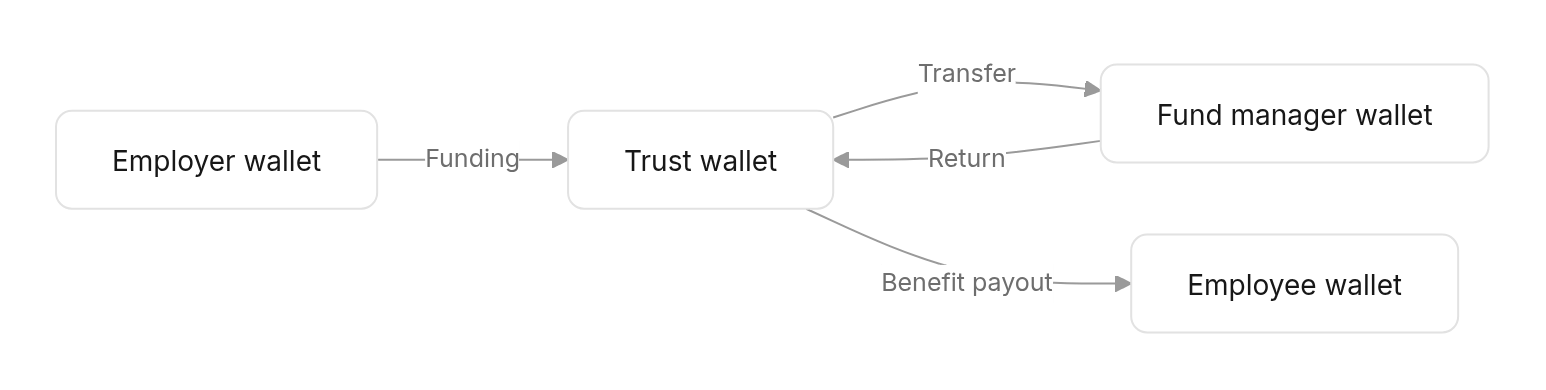
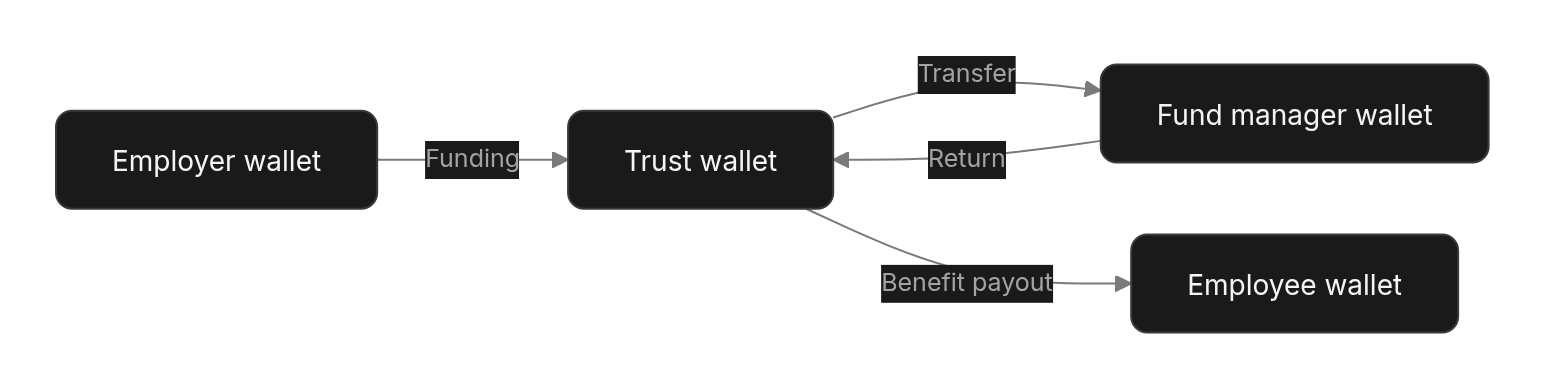
Every party that holds benefit money gets a wallet. The platform opens them; nobody has to apply.
| Party | Wallet opened | Used for |
| - | - | - |
| **Employer** | When the employer is activated | Paying into its trust |
| **EOSB trust** | When the employer is activated | Receiving employer payments; paying benefits; sending to the fund manager |
| **Fund manager** | When the regulator verifies it | Receiving from and returning to trusts |
| **Employee** | When they are registered, and again before a payout if they still have none | Receiving their benefit |
 **Wallets are tied to a phone number.** A person's or organisation's wallet is opened on the contact phone registered on the platform. If that number already has a SmartPay wallet, the platform links the existing one instead of opening a second. A trust has no phone, so its wallet is opened directly.
**Setting a PIN.** A new wallet holder sets their wallet PIN by messaging SmartPay on WhatsApp from the registered number. Because the message comes from their own phone, that proves the wallet is theirs.
An employee's SmartPay wallet counts as a **verified** payout account straight away, so a leaver with a wallet can be paid without waiting for a bank account check.
## How a wallet payment is authorised
Two separate checks stand behind every wallet payment:
1. **On the platform:** the person confirms with a **one-time code**, and where the flow needs it, the checker approves — for example the trustee approving a benefit payment.
2. **On the gateway:** SmartPay holds a **mandate** for the platform on each wallet: a standing permission to debit it on the platform's instruction, within limits. The platform's code and approvals are what earn the right to use that mandate.
Before any spend, the platform reads the wallet's **live balance** from SmartPay. That is the money that is really there, so a payment must fit within it, whatever the platform's own books say.
## Employer funding from a wallet
A wallet payment into the trust travels in **two legs** through the payment aggregator:
**Wallets are tied to a phone number.** A person's or organisation's wallet is opened on the contact phone registered on the platform. If that number already has a SmartPay wallet, the platform links the existing one instead of opening a second. A trust has no phone, so its wallet is opened directly.
**Setting a PIN.** A new wallet holder sets their wallet PIN by messaging SmartPay on WhatsApp from the registered number. Because the message comes from their own phone, that proves the wallet is theirs.
An employee's SmartPay wallet counts as a **verified** payout account straight away, so a leaver with a wallet can be paid without waiting for a bank account check.
## How a wallet payment is authorised
Two separate checks stand behind every wallet payment:
1. **On the platform:** the person confirms with a **one-time code**, and where the flow needs it, the checker approves — for example the trustee approving a benefit payment.
2. **On the gateway:** SmartPay holds a **mandate** for the platform on each wallet: a standing permission to debit it on the platform's instruction, within limits. The platform's code and approvals are what earn the right to use that mandate.
Before any spend, the platform reads the wallet's **live balance** from SmartPay. That is the money that is really there, so a payment must fit within it, whatever the platform's own books say.
## Employer funding from a wallet
A wallet payment into the trust travels in **two legs** through the payment aggregator:
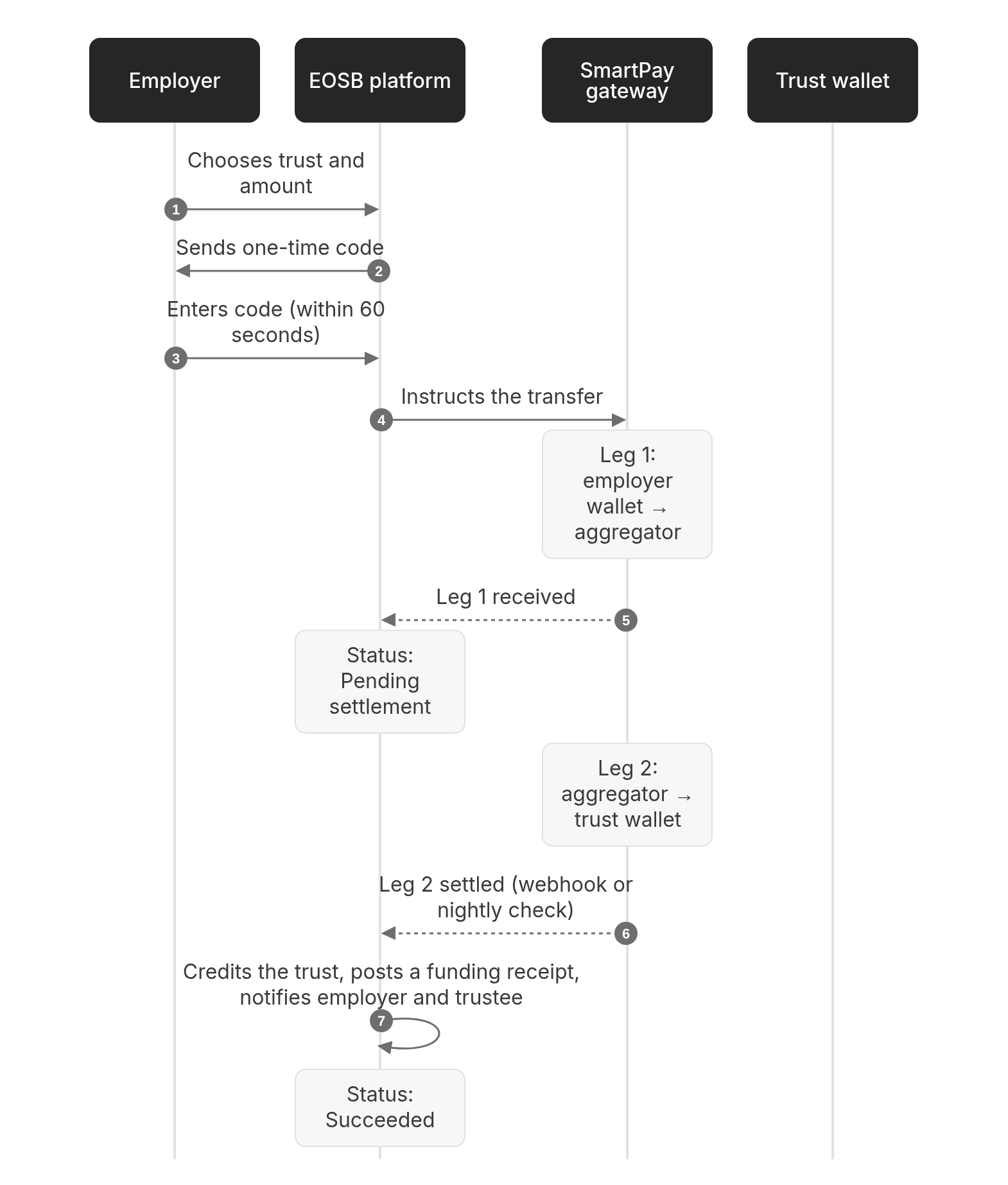
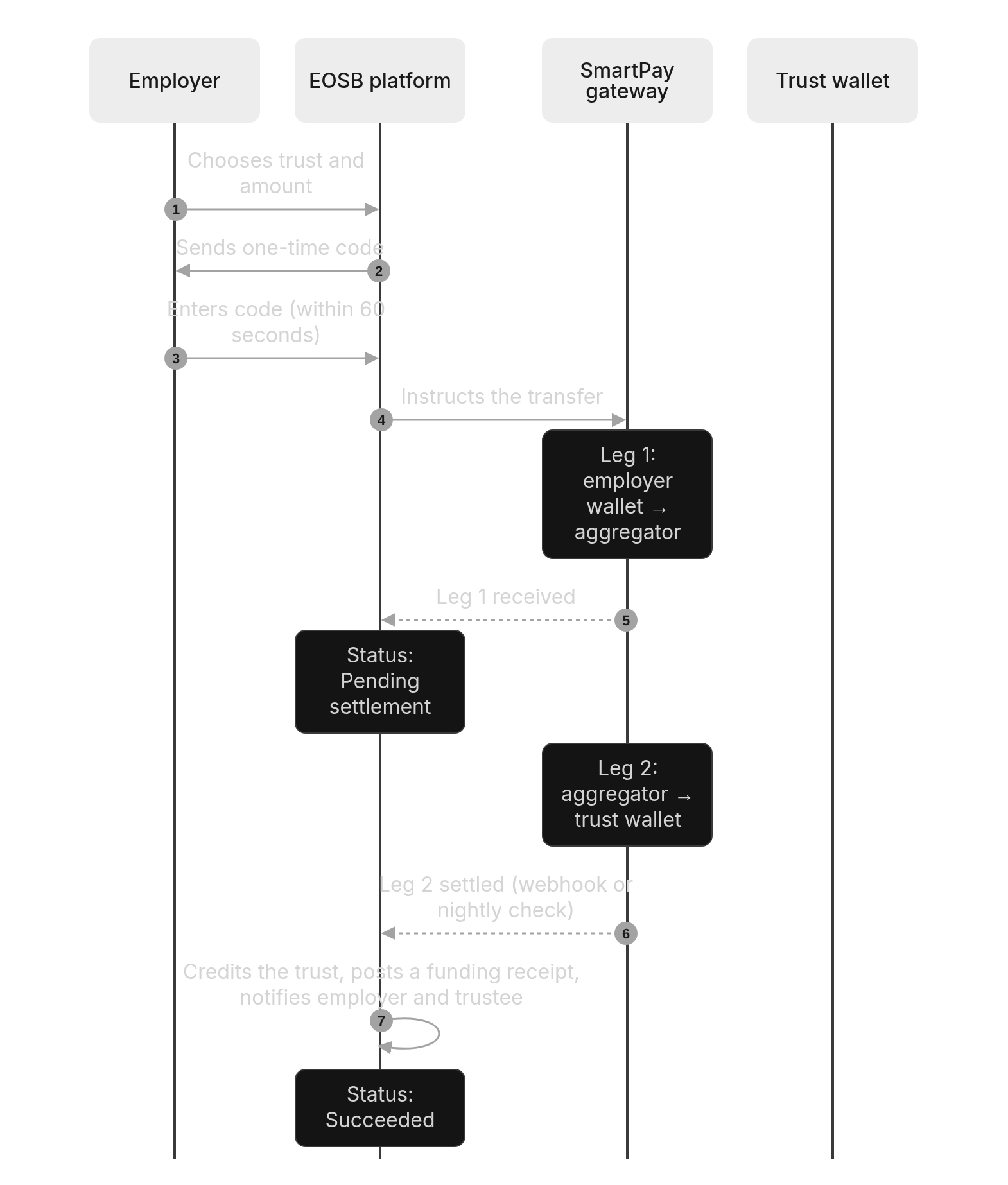 **The money only counts once it is in the trust.** Until the second leg settles, the payment does not add to the trust's assets or improve the funding ratio. This rule comes from the scheme's requirements: funds in transit are not trust funds.
### Paying from the SmartPay portal
An employer can also start a payment from the **SmartPay portal** instead of the EOSB platform: the employer's administrator signs in to SmartPay, names the trust, and moves the money under their wallet PIN. Before anything moves, SmartPay asks the platform whether the trust belongs to that employer, so money can only go to the employer's own trust. When the transfer completes, the platform picks it up and records it exactly as if it had been started on the platform, then settles it the normal way.
### When a wallet payment does not go through
| Reason | What it means | What to do |
| - | - | - |
| Insufficient funds | The source wallet does not hold enough. | Top up the wallet and try again. |
| Declined | SmartPay refused the payment. | Try again; if it repeats, contact the administrator. |
| Mandate rejected | SmartPay holds no mandate on the wallet, or the amount is above the mandate's limits. | Contact the administrator. |
| Wallet blocked | The source or destination wallet is blocked or inactive. | Contact SmartPay or the administrator. |
| Network failure | The outcome is not known yet. | Wait: the platform holds the payment and finds out what happened. Do not pay again. |
| OTP expired | The code was not entered within 60 seconds. | Start again and request a new code. |
## How the platform keeps wallets and books in step
Every transfer carries one reference from start to finish. If a request times out and is retried, SmartPay recognises the reference and does not move the money again.
Only a clear refusal is treated as failed. If the platform cannot tell whether money moved — a network error, a timeout, a payment still processing — it holds the payment for reconciliation instead of marking it failed and letting someone pay again.
SmartPay notifies the platform the moment a transfer completes (a webhook). Because a notification can be lost, every night at 01:30 UTC the platform also pulls the previous day's statement from SmartPay and applies anything it missed. It then checks the other way: any payment the platform still shows as waiting, whose money should have arrived by now, but which SmartPay does not report.
If SmartPay reports something that disagrees with the platform's record, the difference is written to the audit log for someone to investigate. The platform never changes a figure on its own to make them agree.
Benefit payouts and fund manager transfers are final once SmartPay executes them. Employer funding becomes final when the second leg lands in the trust wallet.
## Wallets compared with bank transfers
| | Wallet | Bank or mobile money |
| - | - | - |
| Who moves the money | The platform, on your instruction | You, outside the platform |
| Evidence | Not needed — the gateway confirms | A receipt or advice you upload |
| Who confirms employer funding | The gateway (settlement) | The trustee, against the bank statement |
| When funding counts | When it lands in the trust wallet | When the trustee approves the proof |
| Speed | Minutes | When the trustee reviews (expected within 2 days) |
This documentation is built and hosted on [Mintlify](https://mintlify.com), a developer documentation platform.
**The money only counts once it is in the trust.** Until the second leg settles, the payment does not add to the trust's assets or improve the funding ratio. This rule comes from the scheme's requirements: funds in transit are not trust funds.
### Paying from the SmartPay portal
An employer can also start a payment from the **SmartPay portal** instead of the EOSB platform: the employer's administrator signs in to SmartPay, names the trust, and moves the money under their wallet PIN. Before anything moves, SmartPay asks the platform whether the trust belongs to that employer, so money can only go to the employer's own trust. When the transfer completes, the platform picks it up and records it exactly as if it had been started on the platform, then settles it the normal way.
### When a wallet payment does not go through
| Reason | What it means | What to do |
| - | - | - |
| Insufficient funds | The source wallet does not hold enough. | Top up the wallet and try again. |
| Declined | SmartPay refused the payment. | Try again; if it repeats, contact the administrator. |
| Mandate rejected | SmartPay holds no mandate on the wallet, or the amount is above the mandate's limits. | Contact the administrator. |
| Wallet blocked | The source or destination wallet is blocked or inactive. | Contact SmartPay or the administrator. |
| Network failure | The outcome is not known yet. | Wait: the platform holds the payment and finds out what happened. Do not pay again. |
| OTP expired | The code was not entered within 60 seconds. | Start again and request a new code. |
## How the platform keeps wallets and books in step
Every transfer carries one reference from start to finish. If a request times out and is retried, SmartPay recognises the reference and does not move the money again.
Only a clear refusal is treated as failed. If the platform cannot tell whether money moved — a network error, a timeout, a payment still processing — it holds the payment for reconciliation instead of marking it failed and letting someone pay again.
SmartPay notifies the platform the moment a transfer completes (a webhook). Because a notification can be lost, every night at 01:30 UTC the platform also pulls the previous day's statement from SmartPay and applies anything it missed. It then checks the other way: any payment the platform still shows as waiting, whose money should have arrived by now, but which SmartPay does not report.
If SmartPay reports something that disagrees with the platform's record, the difference is written to the audit log for someone to investigate. The platform never changes a figure on its own to make them agree.
Benefit payouts and fund manager transfers are final once SmartPay executes them. Employer funding becomes final when the second leg lands in the trust wallet.
## Wallets compared with bank transfers
| | Wallet | Bank or mobile money |
| - | - | - |
| Who moves the money | The platform, on your instruction | You, outside the platform |
| Evidence | Not needed — the gateway confirms | A receipt or advice you upload |
| Who confirms employer funding | The gateway (settlement) | The trustee, against the bank statement |
| When funding counts | When it lands in the trust wallet | When the trustee approves the proof |
| Speed | Minutes | When the trustee reviews (expected within 2 days) |
This documentation is built and hosted on [Mintlify](https://mintlify.com), a developer documentation platform.