> ## Documentation Index
> Fetch the complete documentation index at: https://docs.eosb.org/llms.txt
> Use this file to discover all available pages before exploring further.
# Sign in and find your way around
> Get your platform administrator account, sign in and learn the layout of the admin workspace.
## Your account
Another platform administrator creates your account under **User Management**, on the **SSA** tab (see [User accounts](/admin/users)). You receive an email titled **Your EOSB account has been created** with your username and a link to set your password. Setting the password and signing in work the same way for every user; see [Set your password](/employer/getting-started/set-password) and [Sign in](/employer/getting-started/sign-in).
A new environment starts with no users at all. The first platform administrator is created by the technical team that installs the platform; every other account is created from the screens.
## Your workspace
After signing in you arrive on **Employment**.
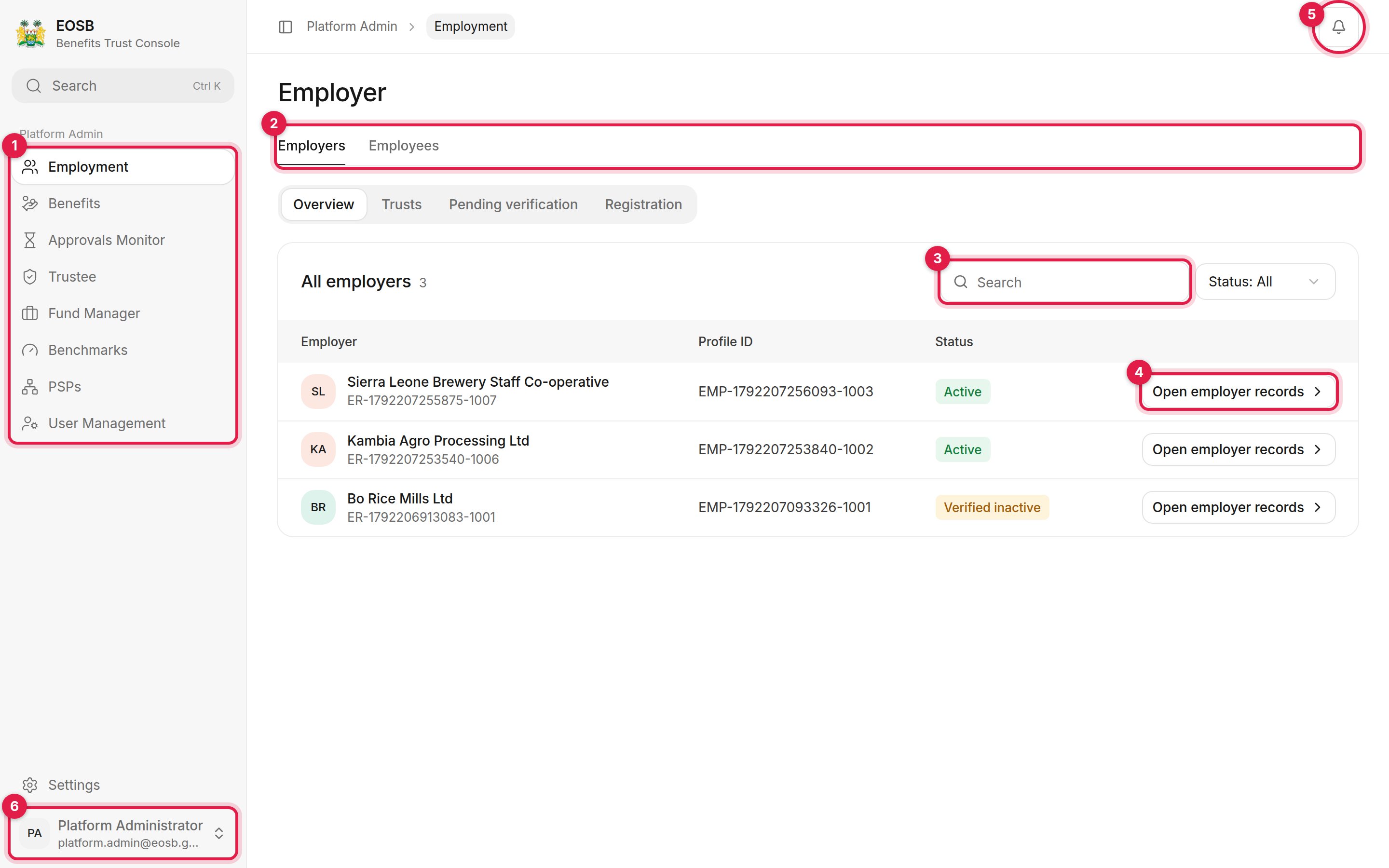 1. **Navigation**:
* **Employment** — employers, their trusts, registrations and employees
* **Benefits** — approved benefit payments waiting to be paid out
* **Approvals Monitor** — every decision the platform is waiting on
* **Trustee** and **Fund Manager** — register providers and see who is registered
* **Benchmarks** — the investment benchmarks portfolios are measured against
* **PSPs** — payment service providers connected to the platform
* **User Management** — user accounts for every organisation
2. **Tabs** switch between areas of a page. Many pages have a second row of tabs underneath, like **Overview**, **Trusts**, **Pending verification** and **Registration** here.
3. **Search** narrows a list. Use **Status** next to it to filter.
4. **Open employer records** (or **Review**, **View**, **Manage** on other pages) opens one record.
5. **Notifications.**
6. **User menu**, with **Settings** and **Sign out**. Settings work the same for every user; see [Your account](/employer/account).
**Monthly Accruals** and **Computation Exceptions** are not in the admin menu. Open them from the address bar: add `/regulator/liability/monthly-accruals` to the platform address. See [Monthly accrual](/admin/monthly-accruals).
This documentation is built and hosted on [Mintlify](https://mintlify.com), a developer documentation platform.
1. **Navigation**:
* **Employment** — employers, their trusts, registrations and employees
* **Benefits** — approved benefit payments waiting to be paid out
* **Approvals Monitor** — every decision the platform is waiting on
* **Trustee** and **Fund Manager** — register providers and see who is registered
* **Benchmarks** — the investment benchmarks portfolios are measured against
* **PSPs** — payment service providers connected to the platform
* **User Management** — user accounts for every organisation
2. **Tabs** switch between areas of a page. Many pages have a second row of tabs underneath, like **Overview**, **Trusts**, **Pending verification** and **Registration** here.
3. **Search** narrows a list. Use **Status** next to it to filter.
4. **Open employer records** (or **Review**, **View**, **Manage** on other pages) opens one record.
5. **Notifications.**
6. **User menu**, with **Settings** and **Sign out**. Settings work the same for every user; see [Your account](/employer/account).
**Monthly Accruals** and **Computation Exceptions** are not in the admin menu. Open them from the address bar: add `/regulator/liability/monthly-accruals` to the platform address. See [Monthly accrual](/admin/monthly-accruals).
This documentation is built and hosted on [Mintlify](https://mintlify.com), a developer documentation platform.